Practical Examples of jboss-deployment-structure.xml for WildFly and JBoss EAP
This tutorial provides practical, production-ready examples of how to configure jboss-deployment-structure.xml to fine-tune application modules, dependencies, and classloading on WildFly and JBoss Enterprise Application Platform (EAP). Modern application servers rely on a modular classloading architecture powered by JBoss Modules. Using this descriptor gives you complete control over isolated classpaths, module exclusions, and sub-deployment visibility across complex EAR and WAR deployments.
WildFly & JBoss EAP Deployment Structure Overview
Understanding where to place the descriptor and how namespaces work is essential for avoiding deployment failures:
- WAR Archives: Place the file in
WEB-INF/jboss-deployment-structure.xml. - EAR / JAR Archives: Place the file in
META-INF/jboss-deployment-structure.xml. - Schema Versioning: Modern WildFly versions (WildFly 27+ and JBoss EAP 8.x) use schema version 1.3 (
urn:jboss:deployment-structure:1.3).
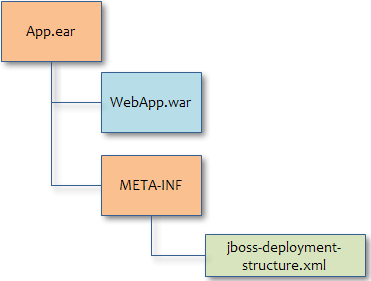
1. Basic Module Dependency Example
To add an external module or custom library installed in the server's modules/ directory to your application classpath, declare a <module> dependency within the <deployment> element:
<?xml version="1.0" encoding="UTF-8"?>
<jboss-deployment-structure xmlns="urn:jboss:deployment-structure:1.3">
    <deployment>
        <dependencies>
            <!-- Include a custom logging or utility module -->
            <module name="org.apache.log4j" export="true"/>
            <!-- Include another deployment dependency -->
            <module name="deployment.itextpdf-5.4.3.jar" export="true"/>
        </dependencies>
    </deployment>
</jboss-deployment-structure>
2. Configuring EAR Sub-Deployments
When deploying Enterprise Archives (EARs), you can target specific sub-modules (such as a nested WAR or EJB-JAR) without polluting the global EAR classpath:
<?xml version="1.0" encoding="UTF-8"?>
<jboss-deployment-structure xmlns="urn:jboss:deployment-structure:1.3">
    <!-- Applied only to myapp.war inside the EAR -->
    <sub-deployment name="myapp.war">
        <dependencies>
            <module name="deployment.itextpdf-5.4.3.jar"/>
        </dependencies>
    </sub-deployment>
</jboss-deployment-structure>
Resource Filtering & Package Exclusions
If you need to exclude specific packages or resource subtrees from a module dependency, define a resource filter:
<?xml version="1.0" encoding="UTF-8"?>
<jboss-deployment-structure xmlns="urn:jboss:deployment-structure:1.3">
    <sub-deployment name="MyWebApp.war">
        <dependencies>
            <module name="deployment.itextpdf-5.4.3.jar"/>
        </dependencies>
    </sub-deployment>
    <module name="deployment.itextpdf-5.4.3.jar">
        <resources>
            <resource-root path="itextpdf-5.4.3.jar">
                <filter>
                    <exclude path="com/itextpdf/awt/geom"/>
                </filter>
            </resource-root>
        </resources>
    </module>
</jboss-deployment-structure>
3. Excluding Server Modules and Using Custom Slots
To prevent WildFly or JBoss EAP from automatically loading a default module (for instance, to bundle a custom version of a library or XML parser), define an <exclusions> block:
<?xml version="1.0" encoding="UTF-8"?>
<jboss-deployment-structure xmlns="urn:jboss:deployment-structure:1.3">
    <deployment>
        <exclusions>
            <module name="org.dom4j"/>
        </exclusions>
        <dependencies>
            <module name="org.xom"/>
        </dependencies>
    </deployment>
</jboss-deployment-structure>
Using Module Slots (e.g., Database Drivers)
Modules can have multiple versions stored in distinct slots. For instance, if you have multiple MySQL JDBC drivers installed under modules/com/mysql/:
~/wildfly/modules/
└── com
    └── mysql
        ├── 8.0
        │   ├── module.xml
        │   └── mysql-connector-j-8.0.33.jar
        └── main
            ├── module.xml
            └── mysql-connector-java-5.1.31-bin.jar
To explicitly bind your application to slot 8.0 instead of main, use the slot attribute:
<?xml version="1.0" encoding="UTF-8"?>
<jboss-deployment-structure xmlns="urn:jboss:deployment-structure:1.3">
    <deployment>
        <exclusions>
            <module name="com.mysql"/>
        </exclusions>
        <dependencies>
            <module name="com.mysql" slot="8.0"/>
        </dependencies>
    </deployment>
</jboss-deployment-structure>
4. Excluding Subsystems (e.g., Running Spring or Custom REST Stacks)
WildFly automatically activates subsystems (CDI/Weld, RESTEasy, JSF) based on application annotations or descriptors. If you are bundling a framework like Spring Boot or a custom Jakarta REST implementation, you must disable the built-in application server subsystems to prevent classloading conflicts:
<?xml version="1.0" encoding="UTF-8"?>
<jboss-deployment-structure xmlns="urn:jboss:deployment-structure:1.3">
    <deployment>
        <exclude-subsystems>
            <subsystem name="jsf"/>
            <subsystem name="jaxrs"/>
            <subsystem name="weld"/>
            <subsystem name="microprofile-opentracing-smallrye"/>
        </exclude-subsystems>
        <exclusions>
            <module name="org.jboss.resteasy.resteasy-cdi"/>
        </exclusions>
    </deployment>
</jboss-deployment-structure>
5. Advanced Classloading Scenarios
Solving ClassCastException with Local-Last Classloading
If the same class exists in multiple sub-deployments within an EAR, you may encounter a ClassCastException. To instruct the classloader to prefer classes exposed by parent/peer sub-deployments over local WAR-level classes, configure local-last:
<?xml version="1.0" encoding="UTF-8"?>
<jboss-deployment-structure xmlns="urn:jboss:deployment-structure:1.3">
    <sub-deployment name="myapp.war">
        <dependencies>
            <module name="deployment.myear.ear.myejbjar.jar"/>
        </dependencies>
        <local-last value="true"/>
    </sub-deployment>
</jboss-deployment-structure>
Exposing Internal System/JDK Classes
Modern JDKs isolate internal platform packages (such as legacy CORBA or Sun/Oracle internal APIs). If a legacy application requires explicit access to internal JDK paths, declare a <system> dependency:
<?xml version="1.0" encoding="UTF-8"?>
<jboss-deployment-structure xmlns="urn:jboss:deployment-structure:1.3">
    <deployment>
        <dependencies>
            <system export="true">
                <paths>
                    <path name="com/sun/corba/se/spi/legacy/connection"/>
                </paths>
            </system>
        </dependencies>
    </deployment>
</jboss-deployment-structure>
Frequently Asked Questions & Troubleshooting
Why is my jboss-deployment-structure.xml ignored?
Ensure the descriptor is located in the exact folder required for your archive type: WEB-INF/ for WAR archives and META-INF/ for EAR/JAR archives. Also check server logs for XML validation errors caused by invalid namespace URIs.
How do I fix ClassNotFoundException or NoClassDefFoundError on WildFly?
Identify the missing module by checking the module tree under wildfly/modules/system/layers/base/ or custom layers. Add an explicit <module name="..."/> entry under the <dependencies> element in jboss-deployment-structure.xml.
What changed in Jakarta EE 10 / EE 11 regarding module exclusions?
With the transition to jakarta.* namespaces in WildFly 27+ and JBoss EAP 8.x, legacy javax.* modules are no longer active by default. If you are upgrading legacy Java EE applications, ensure you exclude conflicting modern subsystems or update your dependencies to Jakarta EE compliant modules.
Conclusion
The jboss-deployment-structure.xml descriptor remains an essential tool for managing modular classloading, resolving dependency conflicts, and running third-party frameworks like Spring on WildFly and JBoss EAP. For full XML schema specs, refer to the official WildFly Core 1.3 Schema Definition.
Recommended Articles
Learn New Quartz 2 API with JBoss EAP or WildFly - Step-by-Step Tutorial
Discover how to set up and use Quartz 2 API with JBoss EAP/WildFly. Includes simple Web application deployment and advanced JDBC Job Store configuration.
How to Debug Module Loading in WildFly 31
Learn how to debug and troubleshoot module loading issues in WildFly, a popular Java-based enterprise application server.
Deploying Java Web Start Applications on WildFly/JBoss EAP 8
Learn how to deploy Java Web Start applications on WildFly/JBoss EAP 8 with this step-by-step guide.
Enhance WildFly Security and Performance with Custom Access Logging
Learn how to enable, customize, and configure access logs for WildFly applications. #WildFly #Java #Middleware #CloudNative