The WildFly Bootable JAR technology allows you to package your enterprise Jakarta EE applications and a trimmed-down WildFly application server into a single executable, runnable JAR file. By provisioning only the exact server layers your application requires, you achieve faster startup times, a lower memory footprint, and seamless cloud deployments.
⚡ Quick Summary
With WildFly 41, you can use the wildfly-jar-maven-plugin combined with Galleon feature-packs to package self-contained executable JARs. Alternatively, WildFly Glow automates layer detection so you don't have to manually configure dependencies in your pom.xml.
1. How WildFly Bootable JAR Works
Under the hood, Bootable JAR relies on Galleon, the provisioning technology powering WildFly. Instead of shipping a full 500MB+ traditional WildFly distribution, Galleon assembles custom server layers (e.g., jaxrs-server, cdi, jpa) into a minimal runtime environment tailored specifically to your deployment artifact.
2. Configuring pom.xml for WildFly 41
To generate a Bootable JAR for WildFly 41, configure the wildfly-jar-maven-plugin in your pom.xml using direct Maven GAV coordinates for the Galleon feature pack:
<project xmlns="http://maven.apache.org/POM/4.0.0"
         xmlns:xsi="http://www.w3.org/2001/XMLSchema-instance"
         xsi:schemaLocation="http://maven.apache.org/POM/4.0.0 http://maven.apache.org/xsd/maven-4.0.0.xsd">
    <modelVersion>4.0.0</modelVersion>

    <groupId>com.example.wildfly</groupId>
    <artifactId>rest-demo-bootable</artifactId>
    <version>1.0.0-SNAPSHOT</version>
    <packaging>war</packaging>

    <properties>
        <maven.compiler.release>21</maven.compiler.release>
        <version.wildfly.bootable.plugin>11.0.2.Final</version.wildfly.bootable.plugin>
        <version.wildfly>41.0.0.Final</version.wildfly>
    </properties>

    <dependencies>
        <dependency>
            <groupId>jakarta.platform</groupId>
            <artifactId>jakarta.jakartaee-web-api</artifactId>
            <version>11.0.0</version>
            <scope>provided</scope>
        </dependency>
    </dependencies>

    <build>
        <plugins>
            <plugin>
                <groupId>org.wildfly.plugins</groupId>
                <artifactId>wildfly-jar-maven-plugin</artifactId>
                <version>${version.wildfly.bootable.plugin}</version>
                <configuration>
                    <!-- WildFly 41 Galleon Feature Pack -->
                    <feature-pack-location>org.wildfly:wildfly-galleon-pack:${version.wildfly}</feature-pack-location>
                    <layers>
                        <layer>jaxrs-server</layer>
                    </layers>
                    <excluded-layers>
                        <layer>deployment-scanner</layer>
                    </excluded-layers>
                    <plugin-options>
                        <jboss-fork-embedded>true</jboss-fork-embedded>
                    </plugin-options>
                    <cloud/>
                </configuration>
                <executions>
                    <execution>
                        <goals>
                            <goal>package</goal>
                        </goals>
                    </execution>
                </executions>
            </plugin>
        </plugins>
    </build>
</project>
3. Building and Executing the Application
Compile and package your application using standard Maven commands:
$ mvn clean packageThe plugin produces an executable file named target/rest-demo-bootable-bootable.jar. Launch it directly using the Java runtime (Java 21 is required for WildFly 41):
$ java -jar target/rest-demo-bootable-bootable.jar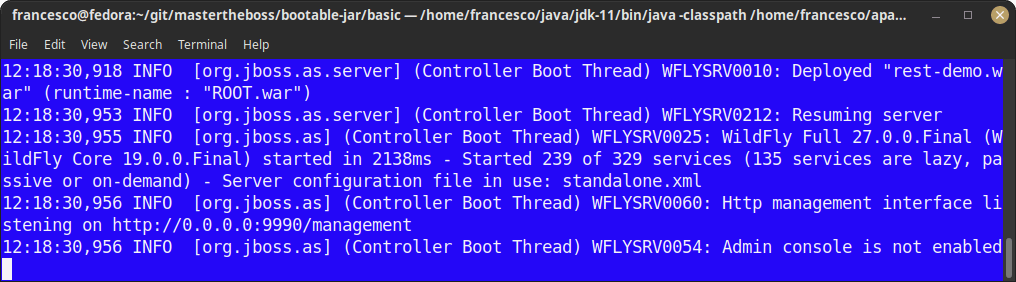
Alternatively, you can boot the application directly during development via the Maven plugin goal:
$ mvn wildfly-jar:runTest your REST endpoints using curl:
$ curl -s http://localhost:8080/rest/itemListJson | jqSample Response Output:
[
  {
    "description": "computer",
    "price": 2500
  },
  {
    "description": "chair",
    "price": 100
  }
]
4. Advanced Features
Creating a Hollow JAR
A Hollow JAR packages only the WildFly runtime server without bundling your application artifact inside. This allows you to deploy applications dynamically at startup or via cloud init scripts:
<configuration>
    <hollow-jar>true</hollow-jar>
</configuration>
Run the hollow runtime and pass your deployment WAR at execution time:
$ java -jar target/wildfly-hollow-bootable.jar --deployment=target/my-app.warCloud Readiness for Kubernetes & OpenShift
Adding the <cloud/> configuration element automatically adjusts server defaults for containerized environments (such as setting up JGroups discovery for Kubernetes and binding management endpoints to non-public interfaces).
5. Auto-Provisioning with WildFly Glow
Manually figuring out Galleon layers can be tedious. WildFly Glow is an intelligent provisioning tool that analyzes your application binaries (WAR files) and automatically determines the minimal set of WildFly layers required.
To automatically provision a Bootable JAR for your WAR file using WildFly Glow CLI, run:
$ wildfly-glow scan target/my-app.war --provision=BOOTABLE_JAR6. Troubleshooting Common Bootable JAR Issues
- Error:
UnsupportedClassVersionError(Class file version 65.0)
Cause: WildFly 41 requires Java 21 or higher.
Fix: Verify your active JDK version usingjava -versionand setJAVA_HOMEto Java 21. - Error:
WFLYSRV0059: ClassPath does not contain a valid server header
Cause: Corrupted Maven cache or incomplete download of feature packs.
Fix: Runmvn clean package -Uto force updates of dependencies and Galleon plugins. - Error:
Address already in use: bind (Port 8080)
Cause: Another process or standalone WildFly instance is occupying port 8080.
Fix: Override the default port at runtime:$ java -Djboss.http.port=8081 -jar target/rest-demo-bootable-bootable.jar
7. Frequently Asked Questions (FAQs)
Q1: What is the main difference between a Bootable JAR and a standard WildFly distribution?
A standard distribution contains all WildFly subsystems and features. A Bootable JAR uses Galleon to include only the subsystems required by your application, reducing startup times to ~1 second and resident memory usage by up to 50%.
Q2: Can I run WildFly 41 Bootable JARs in Docker and Kubernetes?
Yes. Because it is a single self-contained JAR, your Dockerfile becomes as simple as FROM eclipse-temurin:21-jre followed by ENTRYPOINT ["java", "-jar", "app.jar"].
Q3: Do I still need an external application server installed on the target machine?
No. The Bootable JAR contains the WildFly runtime embedded inside. The target host only needs a suitable Java Runtime Environment (JRE 21+).
Conclusion
WildFly 41 Bootable JAR provides an ideal middle ground between classical Jakarta EE enterprise application servers and modern lightweight microservice runtimes. Combined with WildFly Glow, building cloud-ready, self-contained Java executables has never been easier.
Source code for this tutorial: https://github.com/fmarchioni/mastertheboss/tree/master/bootable-jar/basic