OpenShift Virtualization vs VMware: When to Migrate and When to Stay
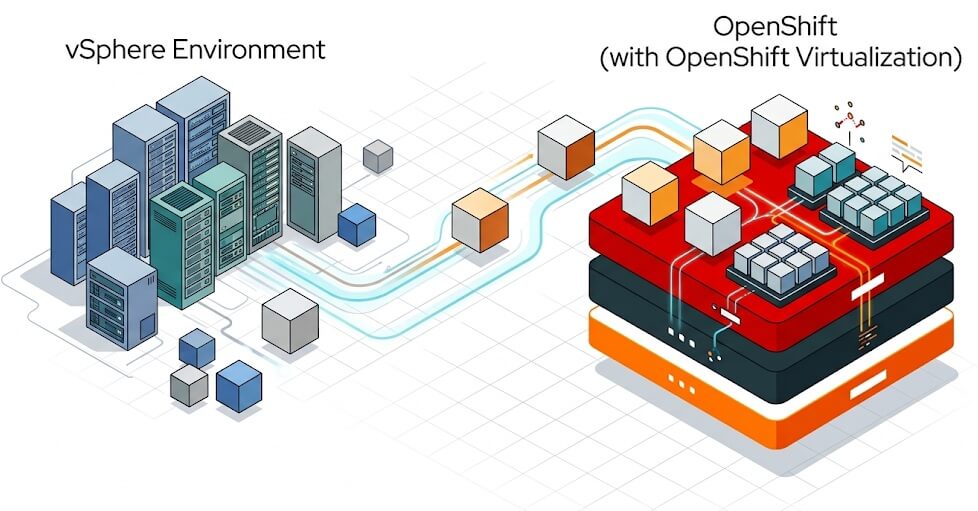
In this article, we will compare Red Hat OpenShift Virtualization and VMware vSphere to decide which workloads should move and which should stay. After Broadcom's acquisition of VMware, many teams are re-evaluating their virtualization platform because of new licensing and subscription models.
However, having an alternative to VMware is not the same as having a reason to migrate. The real question is not "Can OpenShift Virtualization replace VMware?" but "Which of our workloads gain enough from moving to justify the change?"
In short: for new workloads, OpenShift Virtualization is usually an easy candidate. For existing VMware workloads, the answer depends on your drivers: renewal pressure, cost exposure and vendor lock-in can make a migration worthwhile, while deep VMware-specific dependencies can make staying the better choice. That is why many organizations end up with a selective, phased strategy rather than an all-or-nothing decision.
Two Platforms, Two Different Models
Both platforms can host enterprise Virtual Machines. The difference is the abstraction they are built around.
| VMware vSphere | OpenShift Virtualization | |
|---|---|---|
| Core abstraction | Virtualization is the primary infrastructure layer | VMs are Kubernetes objects, managed with the same APIs and tools used for containers |
| Hypervisor | ESXi | Linux KVM, through the KubeVirt project |
| Management | vCenter | OpenShift Console (with VM-centric views), OpenShift APIs, Ansible Automation Platform |
| Best suited to | Organizations that treat VMs as the main runtime | Organizations converging VMs and containers, or modernizing gradually |
For a team already committed to OpenShift, this is a strong advantage. VMs join the same platform as containerized applications, so you can modernize gradually.
For a pure VMware shop, the Kubernetes foundation is a new operating model to learn. That said, day-to-day VM administration does not require deep Kubernetes knowledge: the OpenShift Console provides VM-centric views for creating, starting, migrating and monitoring VMs, and you can automate common tasks with Ansible Automation Platform. The Kubernetes skills become more important as you move into GitOps, platform engineering and troubleshooting at the cluster level.
For a deeper look at the architecture, see What is OpenShift Virtualization?
When OpenShift Virtualization Makes Sense
1. You are already standardizing on OpenShift
This is the strongest reason to adopt OpenShift Virtualization. If you already run OpenShift for containers, adding VMs to the same cluster reduces the number of platforms you operate. VMs and containers then share:
- Namespaces and RBAC.
- The OpenShift APIs and the OpenShift Console.
- Cluster-level monitoring based on Prometheus.
- Declarative configuration and GitOps workflows.
The result is not just a different hypervisor. It is one platform for applications that today use different runtime models.
2. You want to modernize applications gradually
Not every application can be containerized right away. A common strategy is to modernize in stages:
- Move the existing application, as a VM, to OpenShift.
- Keep the legacy components unchanged inside the VM.
- Build the new components as containers on the same cluster.
- Replace the legacy components over time.
This avoids a forced rewrite. It works well for organizations with a large base of traditional applications.
3. You want one platform for VMs and containers
OpenShift Virtualization makes VMs first-class OpenShift workloads. This fits when your goal is to converge VM workloads, container workloads and cloud-native applications on OpenShift.
The benefit is greatest when you also plan to adopt OpenShift-native tooling: GitOps, Operators, OpenShift Pipelines and Kubernetes-based automation.
4. You are building a new virtualization environment
The decision changes when you buy infrastructure for new workloads. With no existing VMware investment to write off, you can evaluate OpenShift Virtualization alongside other platforms from day one.
In this case, you design the infrastructure around the target operating model, not around the legacy one.
5. Licensing renewal is forcing a decision on your existing VM estate
Existing VMs are not automatically better off on VMware. When a renewal brings significant cost increases or bundling you do not need, migrating existing workloads becomes a legitimate option, even if you run few or no containers.
Red Hat sometimes calls this step Platform Modernization: you move VMs as-is, without changing application code, to gain more predictable subscription costs and less dependence on a single hypervisor vendor. The Migration Toolkit for Virtualization (MTV) automates the move, and the free OpenShift migration advisor can assess the readiness of your VMware inventory before you commit.
The savings are real only if they survive a full cost comparison, as we will see in Step 4 of the migration strategy.
When Keeping VMware Is the Better Decision
The availability of OpenShift Virtualization does not mean every VMware environment should be migrated. In several cases, staying on VMware is the more rational engineering choice.
1. Your VMware platform is stable and meets your requirements
This is the most important consideration. Check whether your current environment:
- Is stable and well understood by the operations team.
- Meets your availability requirements.
- Integrates with your backup and disaster recovery systems.
- Provides the storage and networking capabilities you need.
- Is already automated, with an established monitoring and operational model.
If it does, and your licensing costs remain acceptable, replacing it has an opportunity cost. A migration needs a positive business or technical objective, not just the existence of another hypervisor. On the other hand, stability alone is not a reason to stay if the cost of keeping that stability is rising faster than the cost of moving.
2. Your VMware environment has significant operational investment
A VMware environment is rarely just ESXi and vCenter. Over the years, teams build an ecosystem around it:
- Storage integrations, backup platforms and disaster recovery runbooks.
- Monitoring, automation and infrastructure-as-code.
- Network virtualization and security tooling.
- Configuration management, operational procedures and compliance processes.
Replacing VMware means reassessing all of it. A platform that looks cheaper at the hypervisor level may cost more once you add migration, integration, testing, retraining and the operational transition. Many backup and storage vendors now support OpenShift Virtualization, so check which of your tools have a supported equivalent before writing them off.
3. Your organization runs mostly VMs
A common assumption is that OpenShift Virtualization only pays off if you already run containers. That is not entirely true: Red Hat offers OpenShift Virtualization Engine, an edition of OpenShift focused on running VMs, for organizations that want a VM platform without adopting containers right away.
Still, the workload mix changes the nature of the benefit. Compare these scenarios:
| VMs | Containers | Fit for OpenShift Virtualization |
|---|---|---|
| 95-100% | 0-5% | Depends on your drivers: OpenShift Virtualization Engine can deliver cost predictability and vendor independence, but you adopt a new operating model mainly to get a new VM platform. Validate the savings and the team's readiness first. |
| 50% | 50% | Strong: one platform for both workload types, with fewer operational silos. |
| 20% | 80% | Strong: VMs join a platform you already run and share its pipelines and tooling. |
Note that in a VM-heavy organization, the existing VMware expertise is also a significant operational asset, so factor retraining into the decision.
4. You depend on VMware-specific capabilities
OpenShift Virtualization provides live migration, high availability, scheduling, snapshots, and integration with Kubernetes storage and networking. However, do not assume feature parity just because both platforms run VMs.
Example: vSphere Fault Tolerance (FT). FT keeps a synchronized secondary VM to survive certain host failures with minimal interruption. OpenShift Virtualization uses a different availability model, based on Kubernetes scheduling and cluster mechanisms. Therefore, evaluate it carefully for applications with strict availability requirements.
Introducing OpenShift Virtualization Incrementally
You don't need to migrate off VMware all at once to start using OpenShift Virtualization. You can run both platforms side by side: existing VMs stay on VMware while you move selected workloads, and new containers and VMs land on OpenShift.
Running both platforms side by side lets you:
- Build OpenShift operational expertise.
- Deploy new workloads on OpenShift.
- Identify the applications that fit OpenShift Virtualization.
- Validate the storage and networking integrations.
- Test backup and disaster recovery.
- Measure the real operational costs.
- Migrate workloads selectively.
This is usually less risky than a single, large-scale hypervisor replacement.
A Mixed Virtualization Strategy
For many enterprises, the realistic target is a mix of both platforms, at least for a transition period. Classify your workloads into three groups:
Keep on VMware
- Workloads with VMware-specific dependencies
- VDI
- Applications with highly optimized operational processes
- Workloads where migration brings little business value
- Workloads scheduled for retirement soon
Move to OpenShift Virtualization
- New VM workloads
- Existing VMs whose licensing cost no longer justifies VMware
- Workloads closely integrated with containers
- Applications already being modernized
- Workloads that benefit from Kubernetes/OpenShift automation
Retire eventually
- Workloads migrated to containers
- Obsolete applications
- Workloads replaced by SaaS or managed services
This turns the virtualization migration into an application modernization program, not a forced infrastructure replacement.
Decision Matrix: VMware or OpenShift Virtualization
Evaluate each workload against the following questions:
| Question | VMware | OpenShift Virtualization |
|---|---|---|
| Is the workload already stable? | Good reason to remain if costs are acceptable | Candidate when licensing or vendor lock-in is a driver |
| Is it an existing production VM? | Retain if it depends on hypervisor-specific features or integrations | Candidate: MTV migrates it as-is; validate it in a pilot |
| Is it tightly integrated with containers? | Less natural | Strong fit |
| Does it require VMware-specific capabilities? | Strong fit | Requires detailed assessment |
| Is the organization already operating OpenShift? | Less strategic value | Strong fit |
| Is it a new workload? | Viable | Strong candidate |
| Is it VDI? | Strong fit | Evaluate alternatives |
| Does the team have strong Kubernetes skills? | Not required | Not required for basic VM operations; increasingly valuable for automation and troubleshooting |
| Is application modernization planned? | Can remain temporarily | Strong fit: run VMs today, add containers on the same platform later |
| Does migration have a clear business benefit? | Stay if not | Migrate if the benefit is demonstrated |
A Practical Migration Strategy
Instead of asking "Should we replace VMware with OpenShift Virtualization?", follow these five steps:
| Step | Goal | Output |
|---|---|---|
| 1. Identify the reason for change | Name the real driver | A clear business or technical objective |
| 2. Classify your workloads | Decide the destination of each VM | Migrate / keep / modernize / retire lists |
| 3. Build a pilot | Validate on representative workloads | Tested procedures and integrations |
| 4. Compare the complete operating model | Measure the full cost, not just licenses | A realistic cost comparison |
| 5. Migrate selectively | Move only what benefits | A phased migration plan |
Step 1: Identify the reason for change
Name the actual driver. Typical ones are:
- Licensing costs and renewal pressure.
- Infrastructure renewal or hardware refresh.
- Reducing dependence on a single vendor.
- Application modernization or Kubernetes adoption.
- Operational consolidation or strategic platform standardization.
Step 2: Classify your workloads
Split your VMs into four groups:
| Migrate | VMs suitable for migration |
| Keep | VMs that should remain on VMware |
| Modernize | VMs that should be modernized |
| Retire | VMs that should be retired |
Tip: to speed up this step, the OpenShift migration advisor, available at no cost on the Red Hat Hybrid Cloud Console, connects to your VMware environment and produces a readiness report with recommendations for each workload. Use it as an input to your classification, not as a substitute for it.
Step 3: Build a pilot
Select a representative group of workloads and validate:
- Performance, storage and networking.
- Backup, monitoring and high availability.
- Migration procedures and operational processes.
To move the pilot VMs, use the Migration Toolkit for Virtualization. See How to Migrate VMs to OpenShift Virtualization with MTV and Ansible.
Step 4: Compare the complete operating model
Do not compare only the VMware license cost against the OpenShift subscription. Include every cost of running the platform:
| Platform | Infrastructure, storage and networking |
| Resilience | Backup, monitoring and disaster recovery |
| Transition | Automation and the migration itself |
| People | Training, operations and support |
Step 5: Migrate selectively
Use the pilot results to decide which workloads should actually move. There is no requirement for every VM to end up on the same platform.
Conclusion
In this article, we compared OpenShift Virtualization and VMware and saw when each one is the better choice. OpenShift Virtualization is a strong fit for new workloads and OpenShift-centric teams, and it can also be a sound destination for existing VM estates when licensing or lock-in is the driver. VMware remains a rational choice for workloads that depend on its specific capabilities or deep ecosystem integrations.
If you decide to move, Red Hat frames the journey as three modernization pathways that you can adopt at your own pace:
1. Platform Modernization
Migrate VMs as-is to reduce lock-in and gain more predictable costs.
2. Operational Modernization
Apply GitOps, Ansible automation and unified observability to your VMs, with no code changes.
3. Application Modernization
Introduce containers, microservices or AI workloads on the same platform when the business needs them.
Whatever path you choose, let the pilot results and a full cost comparison drive the decision.
For a hands-on start, see How to Create a VM on OpenShift Virtualization.
Recommended Articles
Migrate Existing VMs to OpenShift Virtualization: A Comprehensive Guide
Learn how to migrate VMs from VMware vSphere, Red Hat Virtualization, and OpenStack to OpenShift Virtualization. Explore MTV, AAP, and choose the best approach. #OpenShiftVirtualization #VMware #RedHatVirtualization
Getting started with OpenShift Virtualization - A Comprehensive Guide
Learn how OpenShift Virtualization integrates traditional VMs with Kubernetes for seamless management. #OpenShift #Kubernetes #Virtualization
Create and Manage Virtual Machines on OpenShift Virtualization
Learn how to create and manage Virtual Machines on OpenShift Virtualization using templates and instance types. #OpenShiftVirtualization #KubeVirt #Virtualization #Java #Middleware #CloudNative
Set Up Red Hat OpenShift Local on Your Laptop for Cloud Native Development
Learn how to set up an OpenShift cluster using Red Hat OpenShift Local on your laptop. Includes Linux installation steps and Pull Secret download.