Redis Integration with Quarkus made simple
Learn how to integrate Redis with Quarkus 3.x using the high-performance Quarkus Redis Client. This hands-on guide covers managing Redis data structures synchronously and reactively with SmallRye Mutiny, migrating to Jakarta EE (jakarta.*), and leveraging Quarkus Dev Services for zero-config local development and testing.
This tutorial will guide you through accessing Redis in-memory store from a Quarkus 3.x application. We will show which are the key interfaces for storing data structures in Redis and how Quarkus Dev Services greatly simplifies setting up a Dev environment for our Redis application.
Redis Overview
Redis is an open-source in-memory data structure store which you can use as database, cache, and message broker. It supports various data structures such as strings, lists, sorted sets, bitmaps, hyperloglogs and even more.
Redis is commonly used as a caching layer: by storing frequently accessed data in memory, Redis significantly reduces access times compared to fetching data from disk-based databases. This enhances the overall performance of applications.
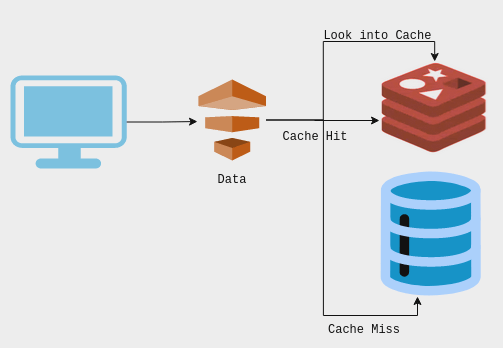
There are several options to access Redis from Java. In this article we will learn how to use Quarkus Client extension for Redis which provides several key interfaces such as:
RedisDataSource: serves as a bridge between your Quarkus application and the Redis server, providing an interface to perform various imperative operations and commands on the Redis data store. It offers functionalities to execute commands, manage data, and interact with the Redis server efficiently.
ReactiveRedisDataSource: provides access to reactive commands using SmallRye Mutiny types (Uni and Multi), ensuring fully non-blocking data operations.
ReactiveKeyCommands: enables the execution of various key-related operations supported by Redis reactively. This includes commands for key management such as DEL, EXISTS, EXPIRE, TTL, and more.
StringCommands: offers methods that directly map to string-related Redis commands, simplifying the execution of common string-based operations and abstracting the underlying Redis commands for handling string data.
Setting up the Quarkus application
In order to connect to Redis with Quarkus 3.x, we will add the quarkus-redis-client extension and Quarkus REST (RESTEasy Reactive) to our project dependencies:
<dependency>
    <groupId>io.quarkus</groupId>
    <artifactId>quarkus-redis-client</artifactId>
</dependency>
<dependency>
    <groupId>io.quarkus</groupId>
    <artifactId>quarkus-rest</artifactId>
</dependency>
<dependency>
    <groupId>io.quarkus</groupId>
    <artifactId>quarkus-rest-jackson</artifactId>
</dependency>
Then, in order to start a Redis Server, we can rely on Quarkus Dev Services which will start it for you automatically provided that:
- You have an active Docker or Container daemon running locally
- You have not configured
quarkus.redis.hostsin yourapplication.properties
Therefore, to satisfy this minimum requirement, just make sure Docker is up and running:
service docker startCoding the Redis Client
Our basic Redis application will store a simple key-value structure. For this purpose, start by adding a Java Record to your project:
public record Data(String key, int value) {
    // You can also define additional methods here if needed
}
Then, let’s write the core RedisService using Jakarta EE annotations (jakarta.inject.Singleton) and Quarkus 3 reactive components:
package com.mastertheboss.quarkus.redis;

import jakarta.inject.Singleton;
import io.quarkus.redis.datasource.RedisDataSource;
import io.quarkus.redis.datasource.ReactiveRedisDataSource;
import io.quarkus.redis.datasource.keys.ReactiveKeyCommands;
import io.quarkus.redis.datasource.string.StringCommands;
import io.smallrye.mutiny.Uni;
import java.util.List;

@Singleton
class RedisService {

    private ReactiveKeyCommands<String> keys;
    private StringCommands<String, Integer> cmd;
    private RedisDataSource redisDS;

    public RedisService(RedisDataSource redisDS, ReactiveRedisDataSource reactiveRedisDS) {
        this.redisDS = redisDS;
        this.keys = reactiveRedisDS.key();
        this.cmd = redisDS.string(Integer.class);
    }

    Uni<Void> del(String key) {
        return keys.del(key)
            .replaceWithVoid();
    }

    int get(String key) {
        return cmd.get(key);
    }

    void set(Data data) {
        cmd.set(data.key(), data.value());
    }

    void increment(String key, int incrementBy) {
        cmd.incrby(key, incrementBy);
    }

    String execute(String command, String param) {
        return redisDS.execute(command, param).toString();
    }

    Uni<List<String>> keys() {
        return keys.keys("*");
    }
}
Here is a quick description of the RedisService methods:
Uni<Void> del(String key)- Deletes a key reactively from the Redis database using Mutiny's
ReactiveKeyCommands.
- Deletes a key reactively from the Redis database using Mutiny's
int get(String key)- Retrieves the integer value associated with a specific key using
StringCommands.
- Retrieves the integer value associated with a specific key using
void set(Data data)- Sets a key-value pair in the Redis database using
StringCommands.
- Sets a key-value pair in the Redis database using
void increment(String key, int incrementBy)- Calls the built-in incrBy function of
StringCommandsto increment the value of a key. An equivalent decrby function exists to decrement the value.
- Calls the built-in incrBy function of
String execute(String command, String param)- Shows how to use
RedisDataSourceto invoke a raw Redis command with a parameter.
- Shows how to use
Uni<List<String>> keys()- Retrieves a list of keys matching a specified pattern reactively from Redis using
ReactiveKeyCommands.
- Retrieves a list of keys matching a specified pattern reactively from Redis using
Adding a REST Resource to access the Service
To expose our Redis operations, we provide a REST endpoint updated for Quarkus 3 REST (RESTEasy Reactive) using jakarta.ws.rs.* annotations:
package com.mastertheboss.quarkus.redis;

import jakarta.inject.Inject;
import jakarta.ws.rs.*;
import jakarta.ws.rs.core.MediaType;
import io.smallrye.mutiny.Uni;
import java.util.List;

@Path("/redisclient")
@Produces(MediaType.APPLICATION_JSON)
@Consumes(MediaType.APPLICATION_JSON)
public class RedisResource {

    @Inject
    RedisService service;

    @GET
    public Uni<List<String>> keys() {
        return service.keys();
    }

    @Path("/{command}/{parameter}")
    @POST
    public String execute(@PathParam("command") String command, @PathParam("parameter") String parameter) {
       return service.execute(command, parameter);
    }

    @POST
    public Data create(Data data) {
        service.set(data);
        return data;
    }

    @GET
    @Path("/{key}")
    public Data get(@PathParam("key") String key) {
        return new Data(key, service.get(key));
    }

    @PUT
    @Path("/{key}")
    public void increment(@PathParam("key") String key, Integer value) {
        service.increment(key, value);
    }

    @DELETE
    @Path("/{key}")
    public Uni<Void> delete(@PathParam("key") String key) {
        return service.del(key);
    }
}
Testing the Redis Client
Testing in dev mode is seamless when using Quarkus Dev Services. Just build and start Quarkus in dev mode:
mvn quarkus:devTo begin with, we can start storing one key in Redis Storage:
curl -X POST -H "Content-Type: application/json" -d '{"key": "sampleKey", "value": 42}' http://localhost:8080/redisclientThen, check the list of keys with the GET command:
curl -X GET http://localhost:8080/redisclient
["sampleKey"]
Next, in our application we have not explicitly created a Java method to decrement a key. For this purpose, let’s execute the raw Redis DECR command via our REST resource:
curl -X POST http://localhost:8080/redisclient/DECR/sampleKeyVerify the value of the key after decrementing it:
curl -X GET http://localhost:8080/redisclient/sampleKey
{"key":"sampleKey","value":41}
Accessing Redis Docker Image
Finally, we will show how you can access the Docker Container that Quarkus boots when you start Dev Service. For this purpose, let’s check the list of active Docker processes:
$ docker ps
e3315d9adb0b   redis:7-alpine              "docker-entrypoint.s…"   16 minutes ago   Up 16 minutes   0.0.0.0:32773->6379/tcp, :::32773->6379/tcp   musing_wing
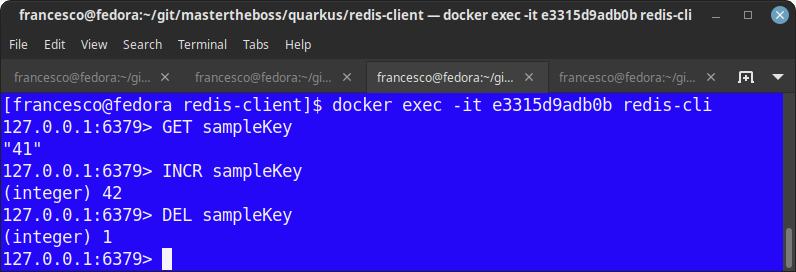
The Redis Image includes the redis-cli executable. To run it, execute it inside the running Docker Process:
docker exec -it e3315d9adb0b redis-cliThen, you can directly access your Redis Server and execute commands from its Command Line:
Frequently Asked Questions (FAQs)
How does Quarkus Dev Services handle Redis in local development?
When starting Quarkus 3 in development mode (mvn quarkus:dev), Quarkus checks if a host connection is specified in application.properties. If none is found and Docker is active, Dev Services automatically spins up a Redis container using Testcontainers, freeing you from manual setup.
What is the difference between RedisDataSource and ReactiveRedisDataSource in Quarkus 3?
RedisDataSource provides synchronous, imperative operations suitable for standard execution flows. In contrast, ReactiveRedisDataSource integrates directly with SmallRye Mutiny, returning Uni or Multi instances for non-blocking reactive pipelines.
How do I update existing Java EE Redis endpoints to Quarkus 3?
You need to migrate all Java EE dependencies and imports from javax.* to Jakarta EE 10 standards (jakarta.inject.*, jakarta.ws.rs.*). Additionally, update your HTTP dependencies to use the Quarkus REST stack (quarkus-rest).
Conclusion
You’ve now learned how to integrate Redis with a Quarkus 3.x application using Jakarta EE standards and Mutiny reactive types. This tutorial demonstrated basic Redis operations using Quarkus. You can expand upon this foundation to build more complex and powerful applications leveraging Redis’s full capabilities.
Source code: https://github.com/fmarchioni/mastertheboss/tree/master/quarkus/redis-client
Recommended Articles
A Comprehensive Comparison of WildFly Application Server and Quarkus Framework in Enterprise Java
Explore the features and use cases of WildFly and Quarkus for robust Java applications. #WildFly #Quarkus #EnterpriseJava
Create Standalone Quarkus Applications and Powerful Scripts Using JBang & Quarkus Command Mode
Learn how to develop standalone Quarkus applications with JBang and powerful scripts using Quarkus Command Mode. #Quarkus #Java #Microservices #CloudNative
Optimizing Your Quarkus Application with Custom Undertow Server Settings
Learn how to customize your Quarkus application's embedded Undertow server settings. #Quarkus #Java #Middleware #CloudNative
Configure Default Transaction Timeout in Quarkus - A Comprehensive Guide
Learn how to configure and manage default transaction timeouts in Quarkus applications. #Quarkus #Java #Middleware