Designing Quarkus Front-Ends with Vaadin made easy
jakarta.*), Quarkus 3.x CDI, and Hibernate ORM for pure, type-safe UI development without writing complex client-side JavaScript.
Vaadin Flow provides a comprehensive set of UI components and tools for creating rich and interactive user interfaces, while Quarkus offers a lightweight and efficient Java framework for developing cloud-native applications. In this article, we will explore how to combine the strengths of Vaadin and Quarkus 3.x to build web applications with ease.
What is Vaadin?
If you are new to Vaadin, you can get a quick introduction in this article which shows how to set up a basic Vaadin application: Vaadin Tutorial: Building Modern Web Applications with Ease
Vaadin Flow follows a component-based architecture, where UI components are created and composed together to build the application’s user interface. These components are written in Java and rendered on the client-side using JavaScript and HTML. This approach allows developers to write the application logic in Java while leveraging the power of the web platform for rendering and interactivity.
In order to use Vaadin Flow with Quarkus 3, you can add the Vaadin Flow extension to your Quarkus project:

We will now build a sample Quarkus 3 application which combines the Vaadin Flow extension with a simple Service that loads data from the Database using Jakarta Persistence and displays it in a Grid Component.
Step 1: Build the Server Side
Firstly, we will create a simple Model that we will display in a Vaadin Grid. With Quarkus 3, we update all annotations from the legacy javax.* namespace to standard jakarta.* packages:
package com.mastertheboss.model;

import jakarta.persistence.Entity;
import jakarta.persistence.GeneratedValue;
import jakarta.persistence.GenerationType;
import jakarta.persistence.Id;
import jakarta.persistence.NamedQuery;
import java.io.Serializable;

@Entity
@NamedQuery(name = "Person.findAll", query = "SELECT p FROM Person p WHERE p.country = :country")
public class Person implements Serializable {

    @Id
    @GeneratedValue(strategy = GenerationType.IDENTITY)
    private int id;

    private String name;
    private String surname;
    private int age;
    private String country;

    // Getters and Setters omitted for brevity
}
Then, in order to fetch the list of Person entities filtered by country, we will add a Jakarta CDI service class:
package com.mastertheboss.service;

import com.mastertheboss.model.Person;
import jakarta.enterprise.context.Dependent;
import jakarta.inject.Inject;
import jakarta.persistence.EntityManager;
import java.util.List;

@Dependent
public class PersonService {

    @Inject
    EntityManager entityManager;

    public List<Person> getPersons(String country) {
        return entityManager.createNamedQuery("Person.findAll", Person.class)
                .setParameter("country", country)
                .getResultList();
    }
}
Step 2: Building the Vaadin View
In Vaadin, a View represents a distinct portion of a web application’s user interface. It defines the visual components and layout that are displayed to the user when accessing a specific URL or navigating to a particular section of the application.
A Vaadin View is typically a Java class that extends a Vaadin layout component, such as VerticalLayout or HorizontalLayout, and contains the @Route annotation. This annotation specifies the URL path that you will use to access the view.
Finally, within the View, we will add a set of components that users will interact with. Here is our Main View, accessible at the root route @Route(""):
package com.mastertheboss.view;

import com.mastertheboss.model.Person;
import com.mastertheboss.service.PersonService;
import com.vaadin.flow.component.Key;
import com.vaadin.flow.component.button.Button;
import com.vaadin.flow.component.button.ButtonVariant;
import com.vaadin.flow.component.combobox.ComboBox;
import com.vaadin.flow.component.grid.Grid;
import com.vaadin.flow.component.html.H1;
import com.vaadin.flow.component.orderedlayout.VerticalLayout;
import com.vaadin.flow.router.Route;
import jakarta.inject.Inject;

import java.util.ArrayList;
import java.util.List;

@Route("")
public class MainView extends VerticalLayout {

    @Inject
    PersonService greetService;

    public MainView() {

        H1 pageTitle = new H1("Welcome to Quarkus 3 Vaadin!");
        add(pageTitle);

        ComboBox<String> comboBox = new ComboBox<>("Country");
        comboBox.setAllowCustomValue(true);
        List<String> countries = new ArrayList<>();
        countries.add("US");
        countries.add("UK");
        comboBox.setItems(countries);

        Grid<Person> grid = new Grid<>(Person.class);
        grid.removeColumnByKey("id");
        grid.setColumns("name", "surname", "age", "country");
        grid.setSizeFull();
        grid.setWidth("600px");

        Button button = new Button("Search", e -> {
            if (comboBox.getValue() != null) {
                List<Person> persons = greetService.getPersons(comboBox.getValue());
                grid.setItems(persons);
                grid.getDataProvider().refreshAll();
            }
        });

        button.addThemeVariants(ButtonVariant.LUMO_PRIMARY);
        button.addClickShortcut(Key.ENTER);

        add(comboBox, button, grid);
        setWidth("100%");
        setSizeFull();
    }
}
Here is a breakdown of the Vaadin components used in this View:
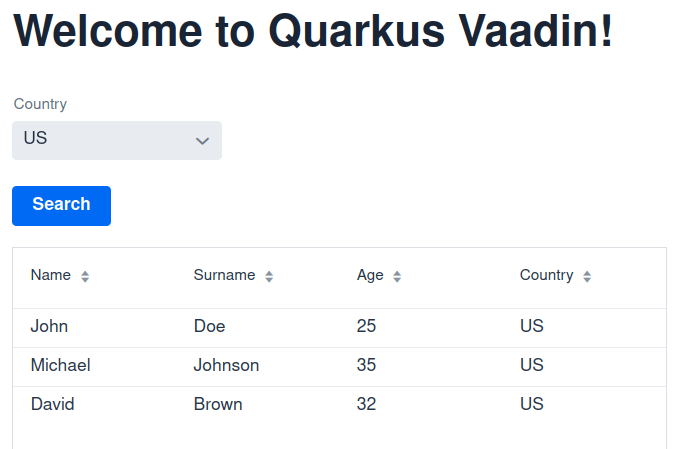
- H1: A Vaadin component representing a level-one heading tag. It displays the title “Welcome to Quarkus 3 Vaadin!”.
- ComboBox: A drop-down selection component populated with available countries.
- Grid: Displays tabular data bound directly to the Java entity model (
Personclass). - Button: Triggers a click event listener (or Enter shortcut) that invokes the Jakarta service bean to fetch data and refresh the Grid dynamically.
Step 3: Running the application
For convenience during development, Quarkus 3 uses automatic Dev Services or embedded databases like H2. You can add an import.sql file into src/main/resources to automatically pre-load data:
INSERT INTO Person (id, name, surname, age, country) VALUES (1, 'John', 'Doe', 25, 'US');
INSERT INTO Person (id, name, surname, age, country) VALUES (2, 'Jane', 'Smith', 30, 'UK');
INSERT INTO Person (id, name, surname, age, country) VALUES (3, 'Michael', 'Johnson', 35, 'US');
INSERT INTO Person (id, name, surname, age, country) VALUES (4, 'Emily', 'Davis', 28, 'UK');
INSERT INTO Person (id, name, surname, age, country) VALUES (5, 'David', 'Brown', 32, 'US');
Finally, run the application in live-coding mode:
./mvnw quarkus:devUpon selecting a country in the ComboBox and clicking Search, you will see that the Grid Component reloads Data seamlessly via the server listener:
Frequently Asked Questions (FAQs)
1. How does Quarkus 3 handle the migration to Jakarta EE for Vaadin applications?
Quarkus 3 baseline fully upgrades to Jakarta EE 10. You must replace legacy javax.* imports with jakarta.* imports for CDI annotations (jakarta.inject.Inject, jakarta.enterprise.context.Dependent) and Persistence annotations (jakarta.persistence.*). Vaadin Flow components for Quarkus 3 are fully compatible with this updated ecosystem.
2. Can I use Reactive Programming with Vaadin in Quarkus?
Yes. While Vaadin UI state management occurs on the server, you can use reactive streams (such as SmallRye Mutiny or Reactive Hibernate) in your backend service layer. Once asynchronous data is emitted, you can update the Vaadin Grid or components safely using ui.access() or enabled Server Push features.
3. Does Quarkus Live Reload (Dev Mode) work with Vaadin Views?
Yes, Quarkus live reload fully supports Vaadin Flow UI classes. When you update Java layout definitions, server side logic, or database queries, Quarkus recompiles changes seamlessly without full application restarts.
Conclusion
In conclusion, Vaadin Flow offers a powerful and efficient way to build front-ends for Quarkus applications. By combining the ease and productivity of full-stack Java development with Quarkus 3.x and the rich UI capabilities of Vaadin, developers can create modern and feature-rich web applications with minimal friction.
Source code: https://github.com/fmarchioni/mastertheboss/tree/master/quarkus/vaadin-demo
Recommended Articles
A Comprehensive Comparison of WildFly Application Server and Quarkus Framework in Enterprise Java
Explore the features and use cases of WildFly and Quarkus for robust Java applications. #WildFly #Quarkus #EnterpriseJava
Create Standalone Quarkus Applications and Powerful Scripts Using JBang & Quarkus Command Mode
Learn how to develop standalone Quarkus applications with JBang and powerful scripts using Quarkus Command Mode. #Quarkus #Java #Microservices #CloudNative
Optimizing Your Quarkus Application with Custom Undertow Server Settings
Learn how to customize your Quarkus application's embedded Undertow server settings. #Quarkus #Java #Middleware #CloudNative
Configure Default Transaction Timeout in Quarkus - A Comprehensive Guide
Learn how to configure and manage default transaction timeouts in Quarkus applications. #Quarkus #Java #Middleware