Getting started with Quarkus 3
Quarkus 3 brings core upgrades to cloud-native Java, including full support for Jakarta EE 10 (migrating from javax.* to jakarta.*), MicroProfile 6, Hibernate ORM 6, Mutiny 2.x, and native integration with Java 21 Virtual Threads (@RunOnVirtualThread). Upgrading existing Quarkus 2 applications is streamlined using the official quarkus update CLI tooling powered by OpenRewrite.
This article explores the core features of Quarkus 3. Quarkus 3 represents a significant leap forward for modern Java developers, standardizing on Jakarta EE 10, Hibernate ORM 6, enhanced reactive pipelines with SmallRye Mutiny, and first-class support for Java Virtual Threads. We will cover the main highlights, code updates, and practical tooling you can use to seamlessly upgrade existing Quarkus applications.
Quarkus 3 highlights
Let’s discuss the key highlights introduced in Quarkus 3:
- Jakarta EE 10 API: Quarkus 3 aligns fully with the Jakarta EE 10 specification platform. The most noticeable change for developers is the shift from the old
javax.*package namespace to the modernjakarta.*namespace across all specifications (Jakarta REST, Jakarta Persistence, Jakarta Inject, Jakarta Transactions, etc.). - Microprofile 6: The major MicroProfile standard release that aligns with Jakarta EE 10 and provides updated cloud-native APIs (such as OpenTelemetry replacing OpenTracing, updated Health, Metrics, and Config specifications).
- Hibernate ORM 6: Quarkus 3 includes Hibernate ORM 6.x by default, offering major query performance improvements, SQM (Semantic Query Model), better type safety, and native compatibility with Jakarta Persistence 3.1.
- Mutiny 2.x and JDK Flow API: SmallRye Mutiny reactive components have been updated to 2.x, fully integrating with Java’s native
java.util.concurrent.FlowAPI instead of legacy Reactive Streams interfaces. Quarkus REST (RESTEasy Reactive) builds on top of this for high-throughput, non-blocking HTTP endpoints. - Virtual Threads Support (Project Loom): Quarkus 3 provides seamless integration with Virtual Threads on Java 21 LTS. By simply adding the
@RunOnVirtualThreadannotation to your REST endpoints, you can execute blocking code off the event loop on lightweight virtual threads without thread pool bottlenecks. - HTTP/3 and Netty Updates: Built on top of modern Vert.x and Netty foundations, Quarkus 3 introduces HTTP/3 support over QUIC, providing lower network latency, better transport performance, and default encryption.
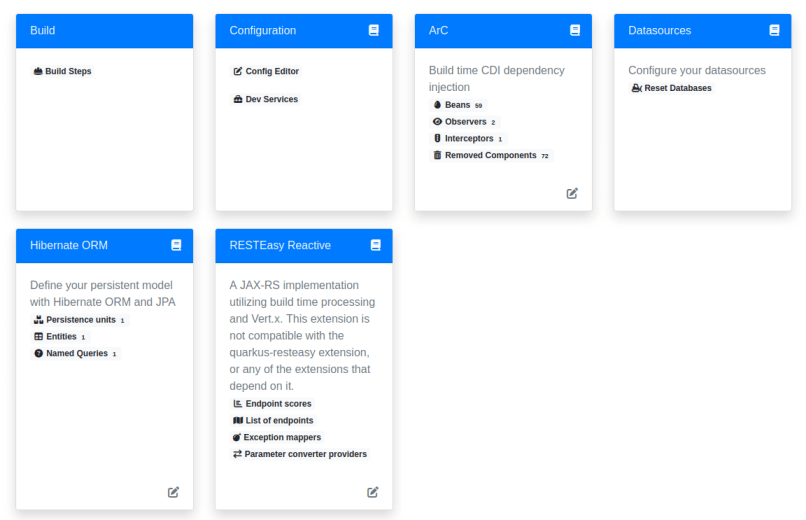
- Redesigned Dev UI 2: A fresh, modern, component-based Dev UI (accessible via
/q/dev) offers deeper insights into application extensions, configuration properties, build steps, and endpoint mappings during development. - Automated Upgrade Tooling: To simplify migrating from Quarkus 2 to Quarkus 3, the Quarkus CLI and Maven plugins integrate OpenRewrite recipes to automatically update package imports, POM dependencies, and configuration keys.
An example Quarkus 3 application
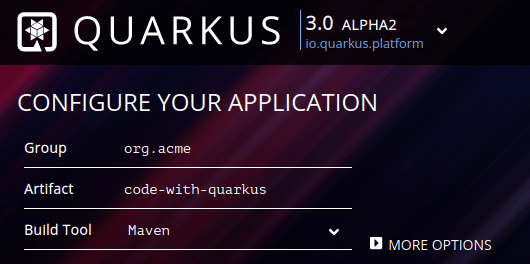
To get started quickly, you can use the interactive Quarkus initializer available at: https://code.quarkus.io/
The online initializer offers modern Quarkus 3 stream generation out of the box:
Alternatively, you can generate a new Quarkus 3 project directly from the Quarkus CLI:
quarkus create app com.mastertheboss:quarkus3-demo --stream=3.xWhen reviewing the generated source files, notice that the modern jakarta.* namespace replaces legacy javax.* annotations in REST endpoints:
package org.acme;

import jakarta.ws.rs.GET;
import jakarta.ws.rs.Path;
import jakarta.ws.rs.Produces;
import jakarta.ws.rs.core.MediaType;

@Path("/hello")
public class GreetingResource {

    @GET
    @Produces(MediaType.TEXT_PLAIN)
    public String hello() {
        return "Hello from Quarkus REST";
    }
}
Checking the project’s pom.xml file, you will notice the updated Quarkus platform BOM targeting 3.x releases:
<quarkus.platform.artifact-id>quarkus-bom</quarkus.platform.artifact-id>
<quarkus.platform.group-id>io.quarkus.platform</quarkus.platform.group-id>
<quarkus.platform.version>3.15.0</quarkus.platform.version>
With Java 21 LTS, leveraging Virtual Threads in Quarkus 3 is completely straightforward. You can annotate blocking REST methods with @io.smallrye.common.annotation.RunOnVirtualThread:
package org.acme;

import jakarta.ws.rs.GET;
import jakarta.ws.rs.Path;
import io.smallrye.common.annotation.RunOnVirtualThread;
import java.util.Arrays;
import java.util.List;

@Path("/cities")
public class CityResource {

    @GET
    @RunOnVirtualThread
    public List<City> getCities() {
        // This blocking operation runs efficiently on a Virtual Thread
        return Arrays.asList(new City("Buenos Aires"), new City("Córdoba"), new City("La Plata"));
    }
}
The @RunOnVirtualThread annotation instructs Quarkus to dispatch the blocking call to a JVM virtual thread, preserving high concurrency without clogging OS worker threads or requiring complex reactive code wrappers.
To compile and run this code with standard Java 21, ensure your Maven compiler plugin targets JDK 21:
<plugin>
    <artifactId>maven-compiler-plugin</artifactId>
    <version>${compiler-plugin.version}</version>
    <configuration>
        <maven.compiler.release>21</maven.compiler.release>
    </configuration>
</plugin>
Tooling to migrate existing Quarkus applications
Upgrading existing codebases from Quarkus 2 to Quarkus 3 is made painless by automated refactoring tooling. For instance, if you are upgrading a Quarkus-Hibernate application like the one in our hands-on guide—Getting started with Quarkus and Hibernate—you can perform the complete migration automatically.
The simplest way to upgrade an existing project is using the official Quarkus CLI command:
quarkus updateAlternatively, you can trigger the underlying OpenRewrite migration recipe directly through Maven using the OpenRewrite plugin:
mvn org.openrewrite.maven:rewrite-maven-plugin:4.36.0:run -Drewrite.configLocation=quarkus3.yml -DactiveRecipes=io.quarkus.openrewrite.Quarkus3The automated recipe rewrites your project dependencies in pom.xml and updates imports across your source code from javax.* to jakarta.*:
[WARNING] Changes have been made to pom.xml by:
[WARNING]     io.quarkus.openrewrite.Quarkus3
[WARNING]         org.openrewrite.maven.ChangePropertyValue: {key=quarkus.platform.version, newValue=3.15.0}
[WARNING] Changes have been made to src/main/java/org/acme/Customer.java by:
[WARNING]     io.quarkus.openrewrite.Quarkus3
[WARNING]         org.openrewrite.java.migrate.JavaxMigrationToJakarta
[WARNING]             org.openrewrite.java.migrate.JavaxPersistenceToJakartaPersistence
[WARNING]                 org.openrewrite.java.ChangePackage: {oldPackageName=javax.persistence, newPackageName=jakarta.persistence, recursive=true}
[WARNING] Changes have been made to src/main/java/org/acme/ExampleResource.java by:
[WARNING]     io.quarkus.openrewrite.Quarkus3
[WARNING]         org.openrewrite.java.migrate.JavaxMigrationToJakarta
[WARNING]             org.openrewrite.java.migrate.JavaxInjectMigrationToJakartaInject
[WARNING]                 org.openrewrite.java.ChangePackage: {oldPackageName=javax.inject, newPackageName=jakarta.inject, recursive=true}
[WARNING]             org.openrewrite.java.migrate.JavaxPersistenceToJakartaPersistence
[WARNING]                 org.openrewrite.java.ChangePackage: {oldPackageName=javax.persistence, newPackageName=jakarta.persistence, recursive=true}
[WARNING]             org.openrewrite.java.migrate.JavaxTransactionMigrationToJakartaTransaction
[WARNING]                 org.openrewrite.java.ChangePackage: {oldPackageName=javax.transaction, newPackageName=jakarta.transaction, recursive=true}
[WARNING]             org.openrewrite.java.migrate.JavaxWsToJakartaWs
[WARNING]                 org.openrewrite.java.ChangePackage: {oldPackageName=javax.ws, newPackageName=jakarta.ws, recursive=true}
Quarkus 3 ships with standard Hibernate ORM 6, replacing legacy Hibernate 5.x releases. You can verify the updated dependency tree after running the migration:
mvn dependency:tree | grep hibernate
[INFO] +- io.quarkus:quarkus-hibernate-orm:jar:3.15.0:compile
[INFO] |  +- org.hibernate.orm:hibernate-core:jar:6.6.0.Final:compile
Start your application in development mode to test your updated setup:
mvn quarkus:devFinally, navigate to the redesigned Dev UI at http://localhost:8080/q/dev/ to verify extension status and endpoints:
Frequently Asked Questions (FAQs)
1. How do I upgrade my Quarkus 2 application to Quarkus 3?
The easiest way is to run the official quarkus update command using the Quarkus CLI inside your project directory. This tool automatically handles dependency updates in your pom.xml or build.gradle file, updates configuration property name changes, and converts legacy javax.* package imports to jakarta.* using OpenRewrite recipes.
2. Which Java versions are supported in Quarkus 3?
Quarkus 3 requires Java 17 as the minimum baseline version. It also fully supports Java 21 LTS, allowing developers to utilize modern JDK features like Virtual Threads (Project Loom), Record Patterns, and Pattern Matching without requiring preview flags.
3. What happened to RESTEasy Classic in Quarkus 3?
While RESTEasy Classic remains available for backwards compatibility, Quarkus 3 strongly recommends Quarkus REST (formerly RESTEasy Reactive). Quarkus REST is built directly on Vert.x and Mutiny, delivering significantly higher performance, lower memory usage, and seamless integration with both reactive processing and Virtual Threads.
Conclusion
Quarkus 3 brings standard-setting cloud-native performance, developer joy, and modern Jakarta EE 10 compatibility to the Java ecosystem. With seamless Virtual Thread integration and robust upgrade tooling, moving your applications to Quarkus 3 is smoother than ever. Happy coding!
Recommended Articles
Monitor Quarkus MicroProfile Metrics with Prometheus - A Comprehensive Tutorial
Learn how to monitor Quarkus MicroProfile metrics using Prometheus, an open-source monitoring solution. #Prometheus #Quarkus #MicroProfile #JavaMonitoring
Integrate PrimeFaces in Quarkus Applications with Jakarta EE 10
Learn how to integrate PrimeFaces library into Quarkus applications for Jakarta EE 10 environments.
A Comprehensive Comparison of WildFly Application Server and Quarkus Framework in Enterprise Java
Explore the features and use cases of WildFly and Quarkus for robust Java applications. #WildFly #Quarkus #EnterpriseJava
Quarkus REST Client API Tutorial: MicroProfile REST Client Implementation
Learn how to develop Quarkus REST Client using MicroProfile REST Client with a basic example and configuration.