gRPC made easy with Quarkus
Build and expose high-performance gRPC services in Quarkus 3.x using RESTEasy Reactive, Jakarta EE 10, and SmallRye Mutiny. Learn how to generate gRPC code from Protobuf files with the quarkus-maven-plugin, inject client stubs using @GrpcClient, and expose endpoints via both REST and gRPC ports.
This article discusses how to create applications with the gRPC framework and Quarkus 3.x. We will reuse the sample Service definition from first Java gRPC application and run it as a Quarkus application integrated with RESTEasy Reactive and Jakarta EE.
Defining the gRPC Service
Firstly, we recommend reading this article for an introduction to the gRPC framework: Getting started with gRPC on Java
We will be using the FileManager Service definition from our Java example which returns a list of Files available in a remote directory:
syntax = "proto3";

option java_multiple_files = true;
option java_package = "com.mastertheboss.filesystem";
option objc_class_prefix = "HLW";

package filesystem;

service FileManager {
  rpc ReadDir (Directory) returns (FileList) {}
}


message Directory {
  string name = 1;
}


message FileList {

string list = 1;
}
Next, we will show how to run the above Service with Quarkus. There are two main benefits that Quarkus brings to gRPC applications:
- Quarkus can register your Services and start a plaintext or SSL gRPC server automatically on Vert.x
- You can automatically generate the Java files and Mutiny reactive bindings from proto files using the quarkus-maven-plugin
Creating the Quarkus project
To build an equivalent Quarkus application from our Proto file in Quarkus 3.x, we need to include the gRPC extension and RESTEasy Reactive (which natively supports SmallRye Mutiny reactive types and Jakarta RESTful Web Services):
<dependency>
    <groupId>io.quarkus</groupId>
    <artifactId>quarkus-resteasy-reactive</artifactId>
</dependency>
<dependency>
    <groupId>io.quarkus</groupId>
    <artifactId>quarkus-grpc</artifactId>
</dependency>
Next, copy the above proto file in the folder src/main/proto as example.proto
The project set up is complete. Next, we will build the REST Endpoint to test our Service using Jakarta EE (jakarta.ws.rs.*):
package io.grpc.example.filesystem;

import jakarta.ws.rs.GET;
import jakarta.ws.rs.Path;
import jakarta.ws.rs.QueryParam;

import com.mastertheboss.filesystem.*;

import io.quarkus.grpc.GrpcClient;
import io.smallrye.mutiny.Uni;

@Path("/filesystem")
public class DemoGRPCEndpoint {

    @GrpcClient("filesystem")
    FileManagerGrpc.FileManagerBlockingStub blockingService;

    @GrpcClient("filesystem")
    FileManager service;

    @GET
    @Path("/blocking")
    public String helloBlocking(@QueryParam("dir") String dir) {
        FileList reply = blockingService.readDir(Directory.newBuilder().setName(dir).build());
        return reply.getList();

    }

    @GET
    @Path("/mutiny")
    public Uni<String> helloMutiny(@QueryParam("dir") String dir) {
        return service.readDir(Directory.newBuilder().setName(dir).build())
                .onItem().transform(reply -> reply.getList());
    }

}
The most interesting part is the @GrpcClient annotation, which is used to inject gRPC stubs into the Endpoint.
The first one injects a blocking stub using the standard gRPC API:
@GrpcClient("filesystem")
 FileManagerGrpc.FileManagerBlockingStub blockingHelloService;
The second one injects a Mutiny service interface representing reactive streams receiving either an item or a failure (Uni):
@GrpcClient("filesystem")
 FileManager service;
Coding the Service Implementation
So far we have exposed the gRPC stubs via REST API. We still need to provide the Service implementation for the method readDir. The following DemoGRPCService implements the method as part of the generated FileManager Mutiny interface:
package io.grpc.example.filesystem;

import java.io.File;

import io.quarkus.grpc.GrpcService;
import io.smallrye.mutiny.Uni;
import com.mastertheboss.filesystem.*;

@GrpcService
public class DemoGRPCService implements FileManager {

    @Override
    public Uni<FileList> readDir(Directory req) {
        File f = new File(req.getName());
        if (!f.isDirectory())  {
            throw new RuntimeException(req.getName() + " is not a directory.");
        }

        String[] pathnames = f.list();
        StringBuilder sb = new StringBuilder();
        if (pathnames != null) {
            for (String pathname : pathnames) {
                sb.append("[File=").append(pathname).append("]");
            }
        }

        return Uni.createFrom().item(sb.toString())
                .map(res -> FileList.newBuilder().setList(res).build());
    }

}
Generating the Classes from Proto files
To generate the Java classes and Mutiny interfaces defined in the Proto file, include the quarkus-maven-plugin configured with the goals generate-code and generate-code-tests:
<plugin>
    <groupId>${quarkus.platform.group-id}</groupId>
    <artifactId>quarkus-maven-plugin</artifactId>
    <version>${quarkus.platform.version}</version>
    <executions>
        <execution>
            <goals>
                <goal>build</goal>
                <goal>generate-code</goal>
                <goal>generate-code-tests</goal>
            </goals>
        </execution>
    </executions>
</plugin>
Then, when you build the project:
mvn installthe Java classes will be generated under the folder target/generated-sources/grpc:
target/generated-sources/grpc
└── com
    └── mastertheboss
        └── filesystem
            ├── Directory.java
            ├── DirectoryOrBuilder.java
            ├── FileList.java
            ├── FileListOrBuilder.java
            ├── FileManagerBean.java
            ├── FileManagerClient.java
            ├── FileManagerGrpc.java
            ├── FileManager.java
            ├── Helloworld.java
            └── MutinyFileManagerGrpc.java
Testing the application
You can use the Quarkus dev mode to test the application:
mvn quarkus:devAs you can see from the Console log, the gRPC Server started on 0.0.0.0:9000:
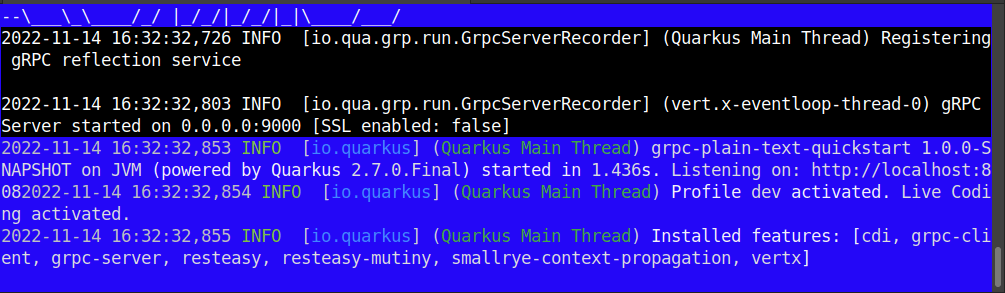
If needed, you can change the default client port configuration in application.properties:
quarkus.grpc.clients.filesystem.port=9000We can test the gRPC Endpoints via HTTP using curl:
$ curl localhost:8080/filesystem/blocking?dir=/tmp

$ curl localhost:8080/filesystem/mutiny?dir=/tmp
In both cases, you should be able to see the directory listing for the server path “/tmp”.
You can also test the application through the native gRPC port. This requires installing the grpcurl tool from https://github.com/fullstorydev/grpcurl/releases
Once installed, you can invoke the remote service directly over gRPC as follows:
grpcurl --plaintext -d '{"name": "/tmp"}' localhost:9000 filesystem.FileManager.ReadDirFrequently Asked Questions (FAQs)
How do I update gRPC applications from Quarkus 2.x to Quarkus 3.x?
To upgrade to Quarkus 3.x, replace all standard JAX-RS imports (javax.ws.rs.*) with Jakarta RESTful Web Services imports (jakarta.ws.rs.*). Replace the legacy quarkus-resteasy dependencies with quarkus-resteasy-reactive, which natively integrates with SmallRye Mutiny types without requiring extra adapter libraries.
How does gRPC code generation work in Quarkus 3.x?
Quarkus processes .proto files placed under src/main/proto using the quarkus-maven-plugin during the generate-code phase. It automatically generates gRPC stubs alongside Mutiny interfaces in target/generated-sources/grpc.
Can REST endpoints and gRPC services run on the same port in Quarkus?
Yes, Quarkus leverages Vert.x to multiplex HTTP/1.1 and HTTP/2 traffic on the main HTTP port (default 8080) or run gRPC on a dedicated port (default 9000) depending on your configuration.
Conclusion
This article showed how to run a simple gRPC Service designed in Java as a Quarkus REST Service using Quarkus 3.x, RESTEasy Reactive, and Jakarta EE.
You can find the source code for this article here: https://github.com/fmarchioni/mastertheboss/tree/master/quarkus/grpc-demo
Recommended Articles
A Comprehensive Comparison of WildFly Application Server and Quarkus Framework in Enterprise Java
Explore the features and use cases of WildFly and Quarkus for robust Java applications. #WildFly #Quarkus #EnterpriseJava
Create Standalone Quarkus Applications and Powerful Scripts Using JBang & Quarkus Command Mode
Learn how to develop standalone Quarkus applications with JBang and powerful scripts using Quarkus Command Mode. #Quarkus #Java #Microservices #CloudNative
Configure Default Transaction Timeout in Quarkus - A Comprehensive Guide
Learn how to configure and manage default transaction timeouts in Quarkus applications. #Quarkus #Java #Middleware
Query Quarkus REST Service with Ajax and jQuery
Learn how to create an Ajax front-end to a Quarkus REST application using jQuery and query a sample REST service running on Quarkus 0.16.1