How to configure Logging with Quarkus
Quarkus 3.x uses JBoss Log Manager as its underlying logging facade, offering seamless integration with Jakarta EE 10, RESTEasy Reactive, and Mutiny. You can configure log levels, custom formats, JSON output, and rotation policies directly inside application.properties without changing application code or adding heavy logging dependencies.
Quarkus uses the JBoss Log Manager project as a facade for application logging. Therefore, the main configuration options should be familiar to JBoss/WildFly users. With the release of Quarkus 3.x, logging seamlessly supports Jakarta EE 10 APIs and RESTEasy Reactive. Let’s see how to configure the most common options.
Quarkus logging in a nutshell
To use Logging with Quarkus, you don’t need to include any extra dependencies in your project. JBoss Log Manager is a transitive core dependency present in any Quarkus runtime. Here is an example using Quarkus 3.x and Jakarta RESTful Web Services (RESTEasy Reactive):
import jakarta.ws.rs.*;
import jakarta.ws.rs.core.MediaType;

import org.jboss.logging.Logger;

@Path("/hello")
public class GreetingResource {
	private static final Logger LOG = Logger.getLogger(GreetingResource.class);

    @GET
    @Produces(MediaType.TEXT_PLAIN)
    public String hello() {
    	LOG.info("Called Hello");
        return "Hello RESTEasy Reactive";
    }
}
When you request the example endpoint, the INFO message will be printed on the Console:
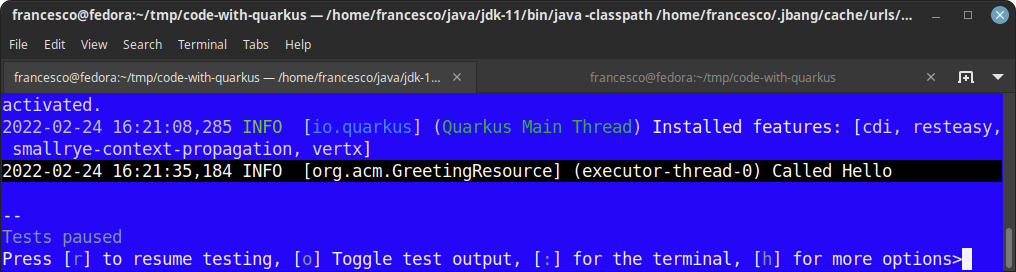
The default log level is INFO. The following log levels are available:
- OFF – Turns off logging.
- FATAL – A critical service failure/complete inability to service requests of any kind.
- ERROR – A significant disruption in a request or the inability to service a request.
- WARN – A non-critical service error or problem that may not require immediate correction.
- INFO – Default. Service lifecycle events or important related very-low-frequency information.
- DEBUG – Messages that convey extra information regarding lifecycle or non-request-bound events which may be helpful for debugging.
- TRACE – Messages that convey extra per-request debugging information that may be very high frequency.
- ALL – Special level for all messages including custom levels.
How to change the default Log Level
The property you need to use is quarkus.log.level. You can set it in application.properties. As an alternative, you can pass it with -Dquarkus.log.level=LEVEL at startup:
quarkus.log.level=DEBUGIn most cases, you won’t need to change the Log Level for all packages available in your application. For example, you can define a log level for a single namespace such as RESTEasy Reactive or your business logic package:
quarkus.log.category."io.quarkus.resteasy.reactive".level=DEBUG
quarkus.log.category."org.jboss.resteasy".level=DEBUG
How to change the Log Format and Output
Quarkus inherits from JBoss Log Manager a set of options to customize the format of logging output. You can read the full list of patterns that you can plug into your log format in the Project Documentation. As an example, here is how to define a custom Console log format which prints the Date – Log Level – ClassName - execution Thread - Log message – CR:
quarkus.log.console.format=%d{HH:mm:ss} %-5p [%c{2.}] (%t) %s%e%nThe above results in the following output on the Console:
16:33:48 INFO [or.ac.GreetingResource] (executor-thread-0) Called HelloOn the other hand, if you need to produce Console logs in JSON format for containerized environments like Kubernetes, you can set the following property to true:
quarkus.log.console.json=trueJSON Logging requires an external extension dependency in your project POM:
<dependency>
    <groupId>io.quarkus</groupId>
    <artifactId>quarkus-logging-json</artifactId>
</dependency>
Now, your Console emits logs in structured JSON Format:
{
   "timestamp":"2024-02-24T16:38:57.423+01:00",
   "sequence":1472,
   "loggerClassName":"org.jboss.logging.Logger",
   "loggerName":"org.acme.GreetingResource",
   "level":"INFO",
   "message":"Called Hello",
   "threadName":"executor-thread-0",
   "threadId":94,
   "mdc":{

   },
   "ndc":"",
   "hostName":"fedora",
   "processName":"code-with-quarkus-dev.jar"
}
Finally, to log to a File, you have to enable the File Log Handler. If you don’t provide a File Path for your logs, Quarkus will write logs in the default file quarkus.log. Here is an example configuration:
quarkus.log.file.enable=true
# Send output to a trace.log file under the logs directory
quarkus.log.file.path=/home/quarkus/logs/trace.log
quarkus.log.file.level=TRACE
How to Rotate Log files
When logging to a File, you should configure a rotation policy to prevent your log files from growing excessively. You can do that with the properties quarkus.log.file.rotation.max-file-size and quarkus.log.file.rotation.max-backup-index. The first defines the maximum size of a log file before rotation occurs. The latter sets the maximum number of backup log files to retain.
Example:
quarkus.log.file.enable=true
quarkus.log.file.level=INFO
quarkus.log.file.format=%d{HH:mm:ss} %-5p [%c{2.}] (%t) %s%e%n
quarkus.log.file.rotation.max-file-size=1M
quarkus.log.file.rotation.max-backup-index=100
Using Log4j2 with Quarkus 3.x
You can use external logging frameworks with Quarkus, such as Apache Commons Logging, Log4j2, or SLF4J.
It is important to note that you must not include the standard external library implementation directly (e.g. org.apache.logging.log4j:log4j-core), but rather the JBoss Log Manager bridge module for that API. For example, to use the Log4j2 API with Quarkus, add the following adapter dependency:
<dependency>
    <groupId>org.jboss.logmanager</groupId>
    <artifactId>log4j2-jboss-logmanager</artifactId>
</dependency>
With this setup, you can inject and use the native Log4j2 Logger and LogManager APIs directly in your Jakarta EE resources:
import jakarta.ws.rs.*;
import jakarta.ws.rs.core.MediaType;
import org.apache.logging.log4j.LogManager;
import org.apache.logging.log4j.Logger;

@Path("/hello")
public class GreetingResource {
	private static final Logger logger = LogManager.getLogger(GreetingResource.class);

    @GET
    @Produces(MediaType.TEXT_PLAIN)
    public String hello() {
    	logger.info("Hello from Log4j2 in Quarkus 3.x");
        return "Hello RESTEasy Reactive";
    }
}
Log4j configuration files are ignored by Quarkus
The JBoss LogManager facade intercepts API calls to Log4j logger packages. However, native log4j2.xml configuration files will not be parsed at runtime or in Native images. All logging levels, formats, and appenders must be configured centrally in application.properties using Quarkus configuration properties.
Frequently Asked Questions (FAQs)
How do I log asynchronously in Quarkus 3.x?
By default, console and file logging in Quarkus run efficiently on the underlying event loop. You can explicitly configure asynchronous logging queue parameters using properties such as quarkus.log.console.async=true and quarkus.log.console.async.queue-length=512.
How do I log reactive pipeline events with Mutiny?
When working with Mutiny reactive streams in Quarkus 3.x, you can append .log() to any Uni or Multi pipeline (e.g., Uni.createFrom().item("Hello").log()). This automatically prints subscription, item emission, failure, and cancellation events to the log manager.
How can I set different log levels for runtime vs build time in Quarkus?
Quarkus allows build-time log levels using quarkus.log.min-level. Messages below this level are optimized away during build compilation (including native binary creation) to decrease binary footprint and maximize performance.
Recommended Articles
Configure Default Transaction Timeout in Quarkus - A Comprehensive Guide
Learn how to configure and manage default transaction timeouts in Quarkus applications. #Quarkus #Java #Middleware
A Comprehensive Comparison of WildFly Application Server and Quarkus Framework in Enterprise Java
Explore the features and use cases of WildFly and Quarkus for robust Java applications. #WildFly #Quarkus #EnterpriseJava
Optimizing Your Quarkus Application with Custom Undertow Server Settings
Learn how to customize your Quarkus application's embedded Undertow server settings. #Quarkus #Java #Middleware #CloudNative
Create Standalone Quarkus Applications and Powerful Scripts Using JBang & Quarkus Command Mode
Learn how to develop standalone Quarkus applications with JBang and powerful scripts using Quarkus Command Mode. #Quarkus #Java #Microservices #CloudNative