TestNG Configuration file in a nuthell
TestNG is a powerful testing framework designed to manage complex test suites through XML-driven configuration files. By defining a testng.xml file, developers can organize test classes, define execution groups, pass dynamic parameters, and run tests in parallel without modifying test source code. This tutorial provides a step-by-step guide to configuring and executing TestNG XML suites in Maven projects.
TestNG Example Test suite
Let’s write a proof of concept Hello World example with TestNG. In order to use it, include in your pom.xml the following dependency:
<dependencies>
  <dependency>
    <groupId>org.testng</groupId>
    <artifactId>testng</artifactId>
    <version>7.12.0</version>
    <scope>test</scope>
  </dependency>
</dependencies>
On the other hand, if you are using Gradle, you will need the following basic configuration in your build.gradle file
Here is your example App.java file:
package com.example;

public class App
{

    public int sum(int a, int b) {
        return a+b;
    }

    public int multiply(int a, int b) {
        return a*b;
    }

}
Let’s write a TestNG class for it:
package com.example;

import org.testng.Assert;
import org.testng.annotations.Test;

public class AppTest
{


    public void testSum() {
       App a = new App();

       Assert.assertEquals(10, a.sum(5,5));
    }


    public void testMultiply() {
        App a = new App();

        Assert.assertEquals(25, a.multiply(5,5));
    }
}
Finally, include under the resources folder the following testng.xml file:
<suite name="Suite">

    <test name="Test">
        <classes>
            <class name="com.example.AppTest"/>
        </classes>
    </test>
</suite>
This configuration file states that the Test suite includes the class com.example.AppTest. We need to provide an hint to the maven-surefire-plugin about the suiteXMLFile name:
<plugin>
    <groupId>org.apache.maven.plugin</groupId>
    <artifactId>maven-surefire-plugin</artifactId>
    <version>2.12</version>
    <configuration>
        <suiteXmlFiles>
            <suiteXmlFile>testng.xml</suiteXmlFile>
        </suiteXmlFiles>
    </configuration>
</plugin>
Here’s the Project view:
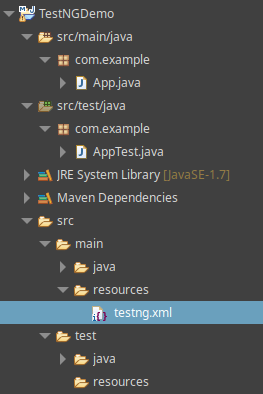
That’s it! You have just executed your first HelloWorld TestNG example
Right-click the XML file to run it:
Suite
Total tests run: 2, Passes: 2, Failures: 0, Skips: 0
Defining Execution groups
TestNG allows you to perform advanced groupings of your Tests. For example, you can declare that methods belong to groups, but you can also specify groups that contain other groups. Then, you can invoke TestNG and choose to include a certain set of groups. You can also filter them using a regular expression. This gives you extra flexibility in how you partition your tests and doesn’t require you to rebuild your code anything if you want to run two different sets of Tests.
For example, we will define two Test Groups by annotating them in the AppTest class:
package com.example;

import org.testng.Assert;
import org.testng.annotations.Test;

public class AppTest
{

    @Test(groups = { "test-sum" })
    public void testSum() {
       App a = new App();

       Assert.assertEquals(10, a.sum(5,5));
    }

    @Test(groups = { "test-multi" })
    public void testMultiply() {
        App a = new App();

        Assert.assertEquals(25, a.multiply(5,5));
    }
}
Now, within the XML file, add the “test-sum” Group to the include list. Also add the “test-multi” to the exclude list:
<suite name="Suite">
    <groups>
        <run>
            <include name="test-sum" />
            <exclude name="test-multi" />
        </run>
    </groups>
    <test name="Test">
        <classes>
            <class name="com.example.AppTest"/>
        </classes>
    </test>
</suite>
Now if you run the XML TestNG suite, it will just execute one test:
Suite
Total tests run: 1, Passes: 1, Failures: 0, Skips: 0
Common Problems & Solutions
Problem: Maven Surefire executes JUnit tests instead of TestNG tests.
Cause: Surefire detects both frameworks on the classpath and defaults to JUnit.
Solution: Explicitly specify <suiteXmlFile>testng.xml</suiteXmlFile> inside maven-surefire-plugin configuration.
Problem: testng.xml fails XML parsing with Cannot find class in classpath.
Cause: Fully qualified class names in <class name="..."/> are misspelled or missing.
Solution: Verify package and class names match your compiled Java test classes under src/test/java.
Recommended Articles
Learn to Set Up and Execute Basic Tests with TestNG - A Comprehensive Guide
Discover how to set up and execute basic tests using TestNG, the powerful open-source testing framework. #TestNG #JavaTesting #CloudNative #Middleware
Create a JUnit 5 Project with IntelliJ IDEA - Step-by-Step Guide
Learn how to create a simple JUnit 5 project using IntelliJ IDEA. Follow our step-by-step guide to set up your Maven project, add a basic class and test it using JUnit.
Arquillian Tutorial: Setting Up Jakarta EE Project with Maven
Learn how to set up an Arquillian project for Jakarta EE using Maven. Simplify integration testing with Java middleware.
Master Java EE7 Development with Git, Gradle, Groovy, and Arquillian: A Productive Build and Test Workflow
Learn how to build and test a Java EE7 application using Git, Gradle, Groovy, and Arquillian. Discover a productive workflow for developer productivity and continuous integration.