JUnit 5 assertDoesNotThrow: How to Assert No Exception in Java
Testing happy-path executions to ensure methods run cleanly without throwing unexpected runtime exceptions is a vital part of unit testing. JUnit 5 provides assertDoesNotThrow() to explicitly declare that a block of code must complete without raising errors. In this tutorial, you will learn best practices for exception verification, combining assertAll with assertDoesNotThrow, and using AssertJ fluent assertions.
1. Implicit vs. Explicit Exception Verification
In JUnit, if a test method executes from start to finish without throwing an uncaught exception, the test automatically passes. So, why should you explicitly write assertDoesNotThrow?
- Code Readability: It explicitly communicates your testing intent to other developers (e.g., "This specific operation must execute safely").
- Block Isolation: You can test a specific block of code within a larger test method rather than the whole method execution[cite: 4].
- Custom Failure Messages: It allows you to append meaningful error messages if an unexpected exception occurs[cite: 4].
2. How to Use assertDoesNotThrow in JUnit 5
JUnit 5 Jupiter provides the static method assertDoesNotThrow inside org.junit.jupiter.api.Assertions[cite: 4]. It accepts an Executable lambda expression containing the code block you want to test[cite: 4].
import org.junit.jupiter.api.Test;
import static org.junit.jupiter.api.Assertions.assertDoesNotThrow;

public class MyTest {

    @Test
    public void testMethod() {
        assertDoesNotThrow(() -> {
            // Code that should execute without throwing any exception
        });
    }
}
If an exception is thrown inside the lambda block, JUnit 5 catches it, fails the test execution immediately, and logs the full stack trace[cite: 4].
3. Complete Hands-on Example: Testing a Calculator Class
Let's look at a practical Java example[cite: 4]. Consider the following Calculator class that handles business logic and input validation by throwing runtime exceptions[cite: 4]:
public class Calculator {
    public int divide(int dividend, int divisor) {
        if (divisor == 0) {
            throw new IllegalArgumentException("Divisor cannot be zero");
        }
        return dividend / divisor;
    }

    public int square(int number) {
        if (number < 0) {
            throw new IllegalArgumentException("Number cannot be negative");
        }
        return number * number;
    }

    public double sqrt(double number) {
        if (number < 0) {
            throw new ArithmeticException("Cannot take square root of negative number");
        }
        return Math.sqrt(number);
    }

    public int parse(String input) {
        try {
            return Integer.parseInt(input);
        } catch (NumberFormatException e) {
            throw new NumberFormatException("Invalid number format: " + input);
        }
    }
}
Now, let's write a unit test using assertDoesNotThrow to ensure valid inputs execute without throwing any exceptions[cite: 4]:
import org.junit.jupiter.api.Test;
import static org.junit.jupiter.api.Assertions.*;

public class CalculatorTest {

    Calculator calculator = new Calculator();

    @Test
    void testDivide_NoException() {
        assertDoesNotThrow(() -> calculator.divide(10, 2));
    }

    @Test
    void testSquare_NoException() {
        assertDoesNotThrow(() -> calculator.square(5));
    }

    @Test
    void testSqrt_NoException() {
        assertDoesNotThrow(() -> calculator.sqrt(25.0));
    }

    @Test
    void testParse_NoException() {
        assertDoesNotThrow(() -> calculator.parse("123"));
    }
}
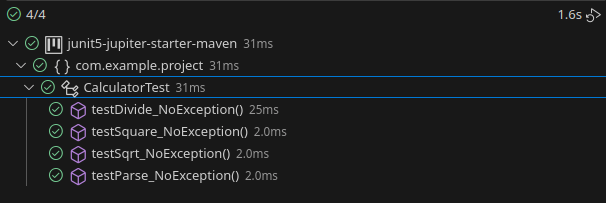
Executing this test class inside your IDE or Maven build produces clean green test runs[cite: 4]:
4. Combining assertAll with assertDoesNotThrow
When running multiple assertions in a single test method, a standard failure will halt execution at the first broken assertion[cite: 4]. To evaluate all operations and collect all errors together, combine assertDoesNotThrow with assertAll[cite: 4]:
@Test
void testMultipleMethods_NoException() {
    assertAll("All methods should execute without throwing exceptions",
        () -> assertDoesNotThrow(() -> calculator.divide(20, 5), "divide() threw an exception"),
        () -> assertDoesNotThrow(() -> calculator.square(4), "square() threw an exception"),
        () -> assertDoesNotThrow(() -> calculator.sqrt(16.0), "sqrt() threw an exception"),
        () -> assertDoesNotThrow(() -> calculator.parse("42"), "parse() threw an exception")
    );
}
5. Alternative Approach: Fluent Assertions with AssertJ
If your project uses AssertJ alongside JUnit, you can write fluent, readable assertions using assertThatNoException():
import org.junit.jupiter.api.Test;
import static org.assertj.core.api.Assertions.assertThatNoException;

public class AssertJCalculatorTest {

    Calculator calculator = new Calculator();

    @Test
    void testSquareWithAssertJ() {
        assertThatNoException().isThrownBy(() -> calculator.square(5));
    }
}
6. JUnit 4 vs JUnit 5: How Exception Handling Evolved
In legacy JUnit 4, there was no native assertDoesNotThrow method. Developers relied on implicit passing or wrapped code in a traditional try-catch block to fail explicitly:
// Legacy JUnit 4 approach
@Test
public void testMethodJUnit4() {
    try {
        calculator.divide(10, 2);
    } catch (Exception e) {
        org.junit.Assert.fail("Method threw an unexpected exception: " + e.getMessage());
    }
}
JUnit 5 drastically simplified this pattern by replacing boilerplate try-catch blocks with functional lambdas and built-in assertion methods[cite: 4].
7. Feature Comparison: JUnit 5 vs AssertJ vs JUnit 4
| Framework | Assertion Syntax | Supports Custom Messages | Lambda / Functional |
|---|---|---|---|
| JUnit 5 (Jupiter) | assertDoesNotThrow(() -> ...) |
Yes | Yes |
| AssertJ | assertThatNoException().isThrownBy(...) |
Yes | Yes |
| JUnit 4 | Implicit or try-catch + fail() |
Manual | No |
8. Frequently Asked Questions (FAQ)
Is assertDoesNotThrow necessary if JUnit passes by default?
Technically, no. However, using assertDoesNotThrow explicitly states your test intention, isolates the specific method call, and allows you to attach custom failure messages to your assertions[cite: 4].
How can I verify that a specific exception type is NOT thrown while allowing others?
If you want to ensure a method does not throw an IllegalArgumentException, you can catch it inside the lambda or use AssertJ's assertThatCode(() -> ...).doesNotThrowAnyExceptionExcept(...).
What happens if an exception is thrown inside assertDoesNotThrow?
JUnit 5 catches the exception, immediately marks the test as failed, and prints the unexpected exception's class name, message, and stack trace in the test report[cite: 4].
Conclusion
Asserting that no exception is thrown during execution is an essential part of writing clean, robust unit tests in Java[cite: 4]. With JUnit 5's assertDoesNotThrow and AssertJ's fluent assertions, you can replace verbose legacy try-catch blocks with modern, clean lambda syntax[cite: 4].
Source code for this tutorial is available on GitHub: mastertheboss JUnit 5 Repository[cite: 4].
Frequently Asked Questions
Why should I use assertDoesNotThrow when tests pass by default without uncaught exceptions?assertDoesNotThrow isolates a specific line or block of code within a method, improves test readability by declaring testing intent, and allows attaching custom failure messages.
How can I verify no exceptions using AssertJ instead of JUnit 5?
AssertJ provides fluent assertion syntax via assertThatNoException().isThrownBy(() -> myService.doSomething()).
Recommended Articles
JUnit 5: Comprehensive Guide to Asserting Exceptions in Tests
Learn how to assert exceptions in JUnit 5 and JUnit4 tests with examples. #JUnit #JavaTesting #CloudNative
Unlock JUnit 5 Test Execution in Maven Projects - A Comprehensive Guide
Ensure your JUnit 5 tests run smoothly with this comprehensive guide to resolving common issues.
Mastering Mockito for Java Applications: Plugging into JUnit and Quarkus Tests
Learn how to integrate Mockito in JUnit and Quarkus tests for effective unit testing. #Mockito #JavaTesting #JUnit #Quarkus
Create a JUnit 5 Project with IntelliJ IDEA - Step-by-Step Guide
Learn how to create a simple JUnit 5 project using IntelliJ IDEA. Follow our step-by-step guide to set up your Maven project, add a basic class and test it using JUnit.