TestContainers made simple with JBang
Combining JBang with Testcontainers and JUnit 5 enables writing lightweight, zero-boilerplate Java test scripts that run real Docker containers directly from the command line. This approach eliminates the need for full Maven or Gradle project setups when building quick proof-of-concept tests for microservices or container images. In this tutorial, you will learn how to create and execute containerized integration tests using JBang.
Things we need to know
Modern software development relies on a diverse set of dependencies, services, and databases. Testing applications in a consistent, isolated, and reproducible environment can be challenging. This is where Testcontainers comes into play. Testcontainers is an open-source Java library that simplifies the integration testing of applications by providing lightweight, disposable containers for various dependencies. The following article provides a comprehensive introduction to TestContainers: Getting Started with Testcontainers for Java .
JBang is a tool that allows you to run Java programs directly from source files. It also simplifies the configuration and dependency management. To learn more about JBang, you can check this article: JBang: Create Java scripts like a pro
By combining TestContainers and JBang we can easily code scripts for testing container images without the need to set up a project for that.
Coding a simple Container Test
We will code a simple Testcontainers example that runs a Test on the Container image of Nginx Web Server: Let’s begin from the Container definition:
@Container
static GenericContainer container = new GenericContainer<>(DockerImageName.parse("nginx"))
.withExposedPorts(80);- An Nginx container is defined with the
GenericContainerclass, specifying the Docker image “nginx.” - The container is configured to expose port 80, allowing external access to the Nginx server running inside the container.
Let’s see the full code:
///usr/bin/env jbang "$0" "$@" ; exit $?

//JAVA 17

//DEPS org.testcontainers:testcontainers-bom:1.17.6@pom
//DEPS org.testcontainers:testcontainers
//DEPS org.testcontainers:junit-jupiter
//DEPS org.junit:junit-bom:5.9.1@pom
//DEPS org.junit.jupiter:junit-jupiter-api
//DEPS org.junit.jupiter:junit-jupiter-engine
//DEPS org.junit.platform:junit-platform-launcher
//DEPS org.junit.platform:junit-platform-reporting
//DEPS org.assertj:assertj-core:3.23.1

import com.github.dockerjava.api.model.ExposedPort;
import org.junit.jupiter.api.Test;
import org.junit.platform.launcher.core.LauncherDiscoveryRequestBuilder;
import org.junit.platform.launcher.core.LauncherFactory;
import org.junit.platform.launcher.listeners.LoggingListener;
import org.junit.platform.launcher.listeners.SummaryGeneratingListener;
import org.testcontainers.containers.GenericContainer;
import org.testcontainers.junit.jupiter.Container;
import org.testcontainers.junit.jupiter.Testcontainers;
import org.testcontainers.utility.DockerImageName;

import java.io.IOException;
import java.net.URI;
import java.net.http.HttpClient;
import java.net.http.HttpRequest;
import java.net.http.HttpResponse;
import java.time.Duration;

import static java.lang.System.out;
import static org.assertj.core.api.Assertions.assertThat;
import static org.junit.platform.engine.discovery.DiscoverySelectors.selectClass;

@Testcontainers
class testnginx {

	@Container
	static GenericContainer container = new GenericContainer<>(DockerImageName.parse("nginx"))
			.withExposedPorts(80);

	@Test
	void testNginxSaysWelcome() throws IOException, InterruptedException {
		var client = HttpClient.newBuilder()
				.version(HttpClient.Version.HTTP_2)
				.followRedirects(HttpClient.Redirect.NORMAL)
				.connectTimeout(Duration.ofSeconds(5))
				.build();

		var request = HttpRequest.newBuilder()
				.uri(URI.create(String.format("http://%s:%d/", container.getHost(), container.getFirstMappedPort())))
				.timeout(Duration.ofSeconds(5))
				.GET()
				.build();

		var response = client.send(request, HttpResponse.BodyHandlers.ofString());

		assertThat(response.statusCode()).isEqualTo(200);
		assertThat(response.body()).contains("Welcome to nginx!");
	}

	public static void main(final String... args) {
		var request = LauncherDiscoveryRequestBuilder.request()
				.selectors(selectClass(testnginx.class))
				.build();

		var launcher = LauncherFactory.create();
		var logListener = LoggingListener.forBiConsumer((t, m) -> {
			System.out.println(m.get());
			if (t != null) {
				t.printStackTrace();
			}
		});
		var execListener = new SummaryGeneratingListener();
		launcher.registerTestExecutionListeners(execListener, logListener);
		launcher.execute(request);
		execListener.getSummary().printTo(new java.io.PrintWriter(out));

		if (execListener.getSummary().getTotalFailureCount() > 0) {
			System.exit(1);
		}

		System.exit(0);
	}
}
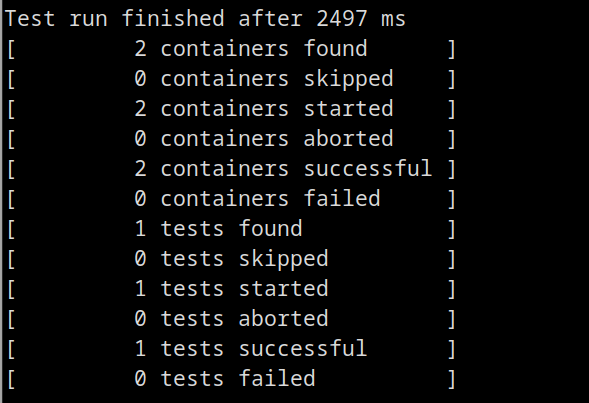
In essence, this Test Class sends an HTTP Request on the Nginx Server. Then it verifies that the Welcome message matches with the default one.
Finally, it is worth mentioning that the main method uses the JUnit Platform Launcher API to gain more control over the test execution process. It allows the script to capture and log detailed information about the test execution, including individual test outcomes and any exceptions that may occur during the test run.
You can run it with:
jbang testnginxYour Container will start right away:

Then, check the output of the Test Report:
Conclusion
You have successfully run a Testcontainers-based test for an Nginx container using JBang. This approach allows you to easily experiment with Testcontainers tests without the need for a complex build setup. Feel free to customize the script or explore additional Testcontainers features based on your testing needs.
Running Custom Container Scripts with Port Binding
When running a JBang Testcontainers script, dynamically mapped ports ensure no port conflicts occur on the host machine. Here is how to retrieve and interact with exposed container ports using Java's built-in HttpClient:
///usr/bin/env jbang "$0" "$@" ; exit $?
//JAVA 21
//DEPS org.testcontainers:testcontainers-bom:1.20.4@pom
//DEPS org.testcontainers:junit-jupiter
//DEPS org.junit:junit-bom:5.12.0@pom
//DEPS org.junit.jupiter:junit-jupiter-api
//DEPS org.junit.jupiter:junit-jupiter-engine
//DEPS org.junit.platform:junit-platform-launcher

import org.testcontainers.containers.GenericContainer;
import org.testcontainers.utility.DockerImageName;
import java.net.URI;
import java.net.http.*;

class ContainerScript {
    static GenericContainer<?> redis = new GenericContainer<>(DockerImageName.parse("redis:alpine"))
            .withExposedPorts(6379);
}
Recommended Articles
Enhance Your Java Tests with TestContainers: Set Up PostgreSQL and Generic Containers
Learn how to use TestContainers for robust database testing in Java applications. Includes setup guide and benefits of using Testcontainers.
Optimize Your Enterprise Java Applications with Testcontainers and Databases
Learn how to use Testcontainers for accurate database testing in your JPA/Hibernate applications. #TestContainers #Java #Databases #JPA #Hibernate
Run CLI Commands in WildFly Docker Images with Embed-Server Feature
Learn how to run CLI commands when building Docker images of WildFly application server using the embed-server feature.
Manage Docker Images from Eclipse JBoss Tools
Learn how to use Eclipse JBoss tools to manage Docker images and deploy applications on top of them