What is the default JBoss password ?
This article explain which is the default JBoss password available in the installation of WildFly application Server or JBoss EAP.
Out of the box, JBoss EAP / WildFly use a File based security to store the credentials More in detail, you will find the username=password combination in the file mgmt-users.properties :
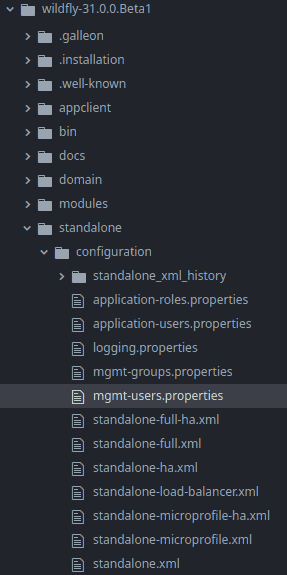
If you open this file, you will see that there’s one user in it but it’s commented:
#admin=2a0923285184943425d1f53ddd58ec7aTherefore, out of the box, there is no default user for JBoss / WildFly. An user is required to access the Web Console or the Command Line Interface (CLI) from a remote host.
The following tutorial discusses how to add an user in WildFly: How to Add an User in WildFly
Besides, you can also opt to enable the existing “admin” user. For example, if you try to add an “admin” user with the add-user.sh tool, you will see the following options available:
User 'admin' already exists and is disabled, would you like to...
 a) Update the existing user password and roles
 b) Enable the existing user
 c) Type a new username
Therefore, if you want to enable the existing admin user, choose to Update the existing user password and roles . Great! You are now able to use the default (commented) JBoss default user!
Recommended Articles
Add Management Users with Wildfly Using Add-user.sh Script - Step-by-Step Guide
Learn how to add management users with Wildfly using the add-user.sh script. Includes step-by-step instructions, keywords, and version info.
Protect Mod_Cluster Manager Application with Password Using htpasswd - Enterprise Java Tutorial
Learn how to secure your mod_cluster manager application using a password and htpasswd for HTTP Basic Authentication.
Configure WildFly and JBoss EAP Default Ports with Ease - A Comprehensive Guide
Learn how to configure WildFly and JBoss EAP default ports in various server releases. Shift all ports using a port offset for easy management.
Discovering Your JBoss/WildFly Version with Ease
Find out your JBoss or WildFly version quickly and easily. Learn multiple methods including server logs, modules folder, and management tools.